Pages and sections — Goeboek Next.js
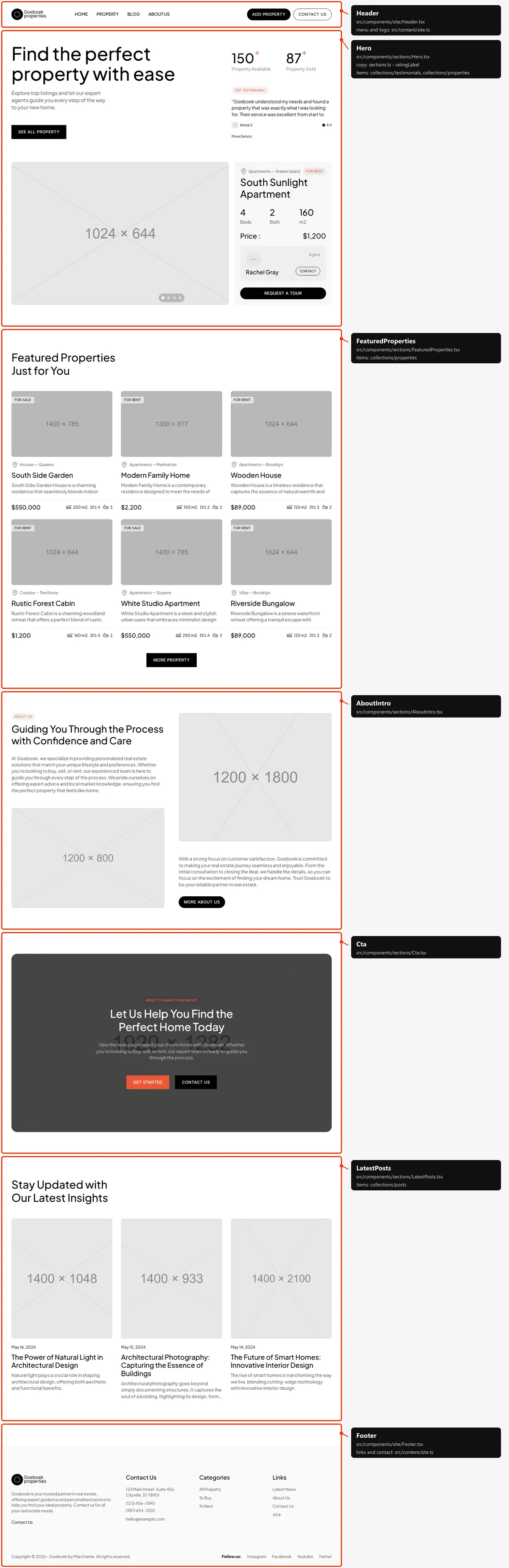
A page is a small file that picks sections and hands them content. src/app/page.tsx is the whole of Home: the hero, Featured Properties, the About block, the call to action and the latest posts.
<main> <Hero … properties={properties.slice(0, hero.slideshow.count).map(…)} /> <FeaturedProperties … properties={properties.slice(featured.offset, featured.offset + featured.count).map(…)} /> <AboutIntro … /> <Cta cta={cta} /> <LatestPosts title={blog.title} posts={posts.slice(0, blog.count).map(toPostCard)} /></main>pageMeta(route, meta)(src/lib/meta.ts) gives a page its browser title, description, canonical link and share card.getProperties(),getTestimonials()andgetPosts()read the collections (see Editing the content), andtoPropertyCard(),toPostCard()andtoTestimonialCard()(src/lib/to-ui.ts) turn their items into what the cards show.- The page passes its copy (
src/content/pages/home.ts) and the items to the sections. - The header and the footer are added around every page’s
<main>bysrc/app/layout.tsx.
The pages
Section titled “The pages”15 kinds of page and 58 addresses in the demo, 55 of them in the sitemap. Every address is built from
src/content/routes.ts.
| Page | Address | Page file | Copy (src/content/pages/) |
Items it shows |
|---|---|---|---|---|
| Home | / |
src/app/page.tsx |
home.ts |
the first 4 properties (slideshow), the next 6 (Featured), the first 5 testimonials, the 4 newest posts |
| Properties | /property |
src/app/property/page.tsx |
properties.ts |
every property, six at a time with “Load More” |
| Type | /type/sell, /type/rent |
src/app/type/[type]/page.tsx |
properties.ts |
every property for sale or for rent |
| Location | /location/<slug> |
src/app/location/[slug]/page.tsx |
properties.ts |
every property of the location |
| Property category | /property-category/<slug> |
src/app/property-category/[slug]/page.tsx |
properties.ts |
every property of the category |
| Agent | /agent/<slug> |
src/app/agent/[slug]/page.tsx |
agent.ts |
the agent, then every property of the agent |
| Property | /property/<slug> |
src/app/property/[slug]/page.tsx |
property.ts |
one property, its agent, two more in its location, up to four related |
| Blog | /blog |
src/app/blog/page.tsx |
blog.ts |
every post, newest first |
| Blog post | /blog/<slug> |
src/app/blog/[slug]/page.tsx |
post.ts |
one post, the three newest, the first property, up to four others of its category |
| About | /about |
src/app/about/page.tsx |
about.ts |
every testimonial, six at a time (four below 1200 px) |
| Contact | /contact |
src/app/contact/page.tsx |
contact.ts |
— |
| Add property | /add-property |
src/app/add-property/page.tsx |
add-property.ts |
— |
| Tour scheduled | /success-scheduled |
src/app/success-scheduled/page.tsx |
success.ts → tour |
— |
| Property submitted | /success-add-property |
src/app/success-add-property/page.tsx |
success.ts → property |
— |
| 404 | any unknown address | src/app/not-found.tsx |
not-found.ts |
— |
The listing pages also read filters in src/content/sections.ts, and share their helpers in src/lib/listing.ts. All
58 addresses of the demo:
| Page | Addresses |
|---|---|
| Fixed pages (8) | /, /property, /blog, /about, /contact, /add-property, /success-scheduled, /success-add-property |
| Types (2) | /type/sell (6 properties), /type/rent (15) |
| Locations (6) | /location/brooklyn (3), /location/manhattan (4), /location/queens (6), /location/staten-island (4), /location/the-bronx (4), /location/no-location (none) |
| Categories (5) | /property-category/apartments (11), /property-category/condos (4), /property-category/houses (2), /property-category/villas (4), /property-category/uncategory (none) |
| Agents (4) | /agent/steve-parker (7), /agent/ingrid-vulk (5), /agent/rachel-gray (9), /agent/no-name (none) |
| Properties (21) | /property/south-sunlight-apartment, /property/marble-house, /property/family-mansion, /property/east-sunlight-apartment, /property/south-side-garden, /property/modern-family-home, /property/wooden-house, /property/rustic-forest-cabin, /property/white-studio-apartment, /property/riverside-bungalow, /property/forest-cabin, /property/queens-family-home, /property/bright-spacious-apartment, /property/eclectic-house, /property/penthouse-apartment, /property/white-studio-loft, /property/green-house, /property/mountain-cottage, /property/balcony-apartment, /property/wooden-bungalow, /property/gardenia-house |
| Posts (12) | /blog/the-power-of-natural-light-in-architectural-design, /blog/architectural-photography-capturing-the-essence-of-buildings, /blog/the-future-of-smart-homes-innovative-interior-design, /blog/the-art-of-interior-design-creating-spaces-that-inspire, /blog/preservation-and-restoration-saving-architectural-heritage, /blog/from-blueprint-to-reality-the-journey-of-construction, /blog/designing-for-well-being-the-intersection-of-health-and-architecture, /blog/sculpting-spaces-the-role-of-art-in-architecture, /blog/balancing-tradition-and-innovation-in-architecture, /blog/harmonizing-form-and-function-in-modern-architecture, /blog/architectural-marvels-iconic-buildings-around-the-world, /blog/sustainable-architecture-building-a-greener-future |
The 404 page answers any other address (the footer’s “404” link opens /404). The sitemap lists the 58 addresses but
the three empty defaults (/location/no-location, /property-category/uncategory, /agent/no-name), which say
noindex, follow. The style guide (/style-guide, src/app/style-guide/) is a page too, but it is not in the sitemap,
is hidden from search engines and linked from nowhere.
To change an address, rename its folder in src/app/ and its entry in routes.ts.
The sections you can use
Section titled “The sections you can use”In src/components/sections/, one file each.
| Section | Used on | Copy |
|---|---|---|
Hero (the title, the lead, “See all Property”, the two facts, the testimonials slideshow, the slideshow of large property cards) |
Home | home.hero |
FeaturedProperties (the title, six cards — four on phones — and “More Property”) |
Home | home.featured |
AboutIntro (the label, title, texts, two photos and “More about Us”) |
Home | home.about |
Cta (the photo with the label, title, text, “Get Started” and “Contact Us”) |
Home, About | cta in sections.ts |
LatestPosts (the title and post cards; with bordered, the post page’s related posts) |
Home, Blog post | home.blog, post.related |
PropertyListing (the label, title and text, the sidebar — the filter, and the agent card on agent pages — and the cards, with “Load More” when given a pageSize) |
Properties, Type, Location, Property category, Agent | filters in sections.ts; agent.ts on agent pages |
PropertyOverview (the property’s facts, photos, texts, details, utilities, video and location; beside it the agent, TourForm and “More in |
Property | property.ts |
TourForm (“Schedule tour”) |
Property, inside PropertyOverview |
property.tour |
RelatedProperties (the title, the related cards and “More Property”) |
Property | property.related |
BlogList (the title and every post) |
Blog | blog.title |
PostArticle (the title, date, category and author, the cover, the text; the sidebar with the logo and about text, “Recent posts” and “Latest Property”) |
Blog post | post.ts |
PageTitle (the centred label, title and lead over a photo or a map) |
About, Contact | about.hero, contact.title |
AboutStory (“Our Journey to Excellence”) |
About | about.journey |
AboutValues (the three values, two photos and “View our property”) |
About | about.values |
Testimonials (every testimonial with “Load More”; anchor #testimonials) |
About | about.testimonials |
ContactDetails (the address, opening hours, e-mail and phones, the contact form) |
Contact | contact.details, contact.form, contact in site.ts |
AddPropertyForm (the page title and the whole form) |
Add property | add-property.ts |
SuccessMessage (the title, the illustration, the two lines and the button) |
Tour scheduled, Property submitted | success.tour, success.property |
The section labels and titles are Label and SectionTitle, the lines between blocks the sections’ bordered top line,
helpers of the design system, not sections. The 404 page draws its one block in the page file, in a plain Section.
How the pages link to each other
Section titled “How the pages link to each other”| Page | Linked from |
|---|---|
| Home | The logo, “Home” in the header, “Return to Homepage” (404), “Back to Homepage” (Property submitted) |
| Properties | “Property” in the header, “See all Property”, “More Property”, “Get Started”, “View our property”, “Browse More Properties”, “All Property” in the footer, “All” in the filter |
| Type | “To Buy” and “To Rent” in the footer, “Sell” and “Rent” in the filter |
| Location, Property category | The filter, a card’s meta line, a property page’s meta line |
| Agent | The filter, the agent’s chip on a hovered card, “Contact” on Home’s large cards, the agent’s name and “View My Property” on a property page |
| A property | Its card (Home, the listings, “More in …”, “Related properties”, “Latest Property”), “Request a tour” on Home’s large cards |
| Blog | “Blog” in the header, “Latest News” in the footer |
| A post | Its card (Home, Blog, “Recent posts”, the related posts) |
| About | “About Us” in the header and the footer, “More about Us”; /about#testimonials from “More Details” in the hero |
| Contact | “Contact us” in the header, “Contact Us” in the footer and the call to action |
| Add property | “Add Property” in the header |
| Tour scheduled, Property submitted | The tour and Add property forms, once sent (Forms) |
Page maps
Section titled “Page maps”Every kind of page with each section outlined and labelled: the component that renders it, the copy it reads (when the
page file passes it by name) and the collections its items come from. The header and the footer take their texts from
src/content/site.ts. Photos are the placeholders of the download; the maps are taken at 1200 px, where the listings
and the property page have their sidebar.
Five blocks: the hero (with the testimonials and the large property cards), Featured Properties, the About block, the
call to action and the latest posts. The copy is in src/content/pages/home.ts (Editing the content),
the call to action’s in sections.ts.
Properties, Type, Location and Property category
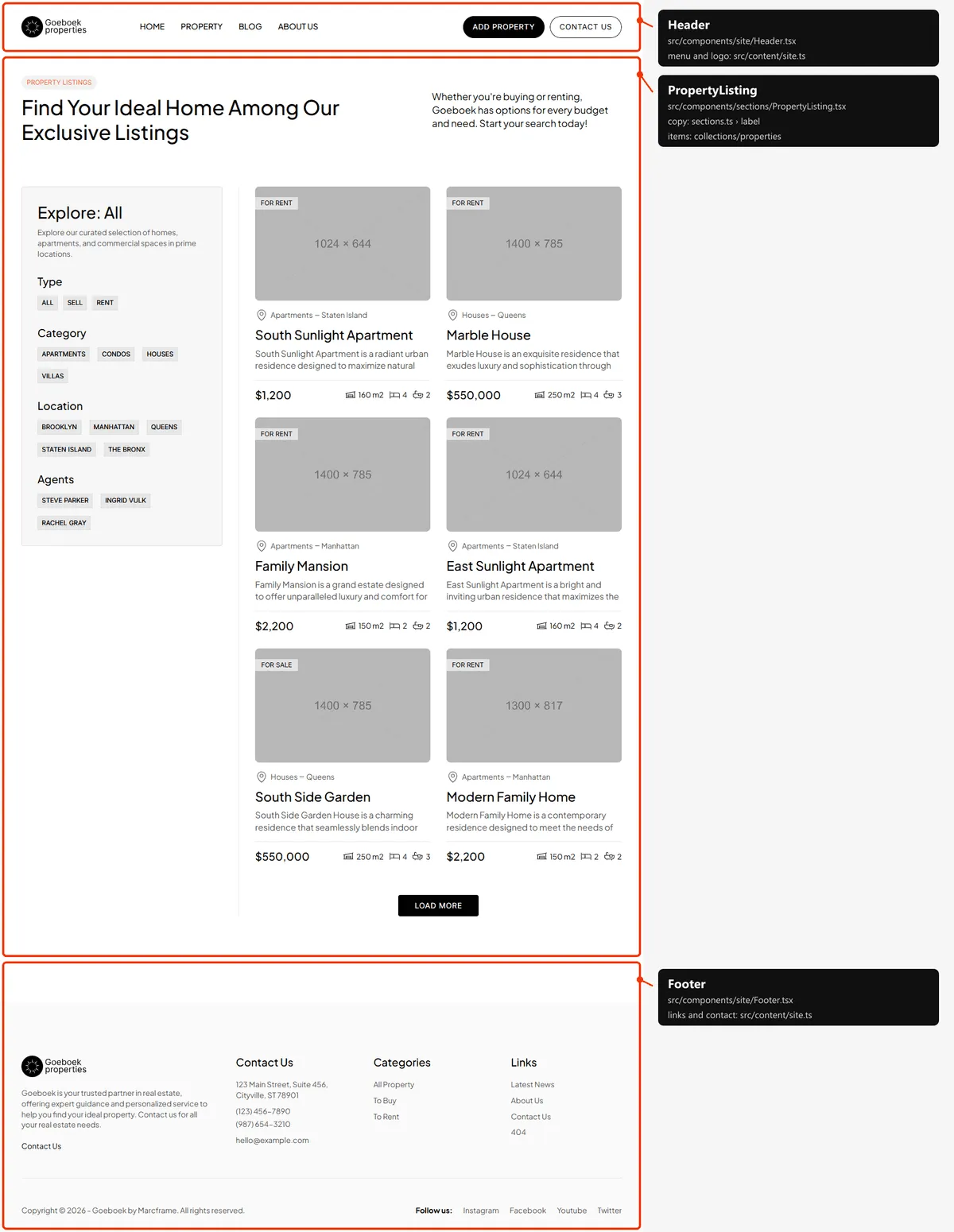
Section titled “Properties, Type, Location and Property category”One block, PropertyListing: the label, title and text, then the filter in the sidebar and the cards in two columns
(one on phones). /property shows six cards and “Load More” adds six at a time; the other listings show all their
properties at once. The filter’s heading names the listing (“Explore: All”, “Explore: Sell”, “Explore: Brooklyn”). The
four kinds of listing share the layout; the map shows Properties.
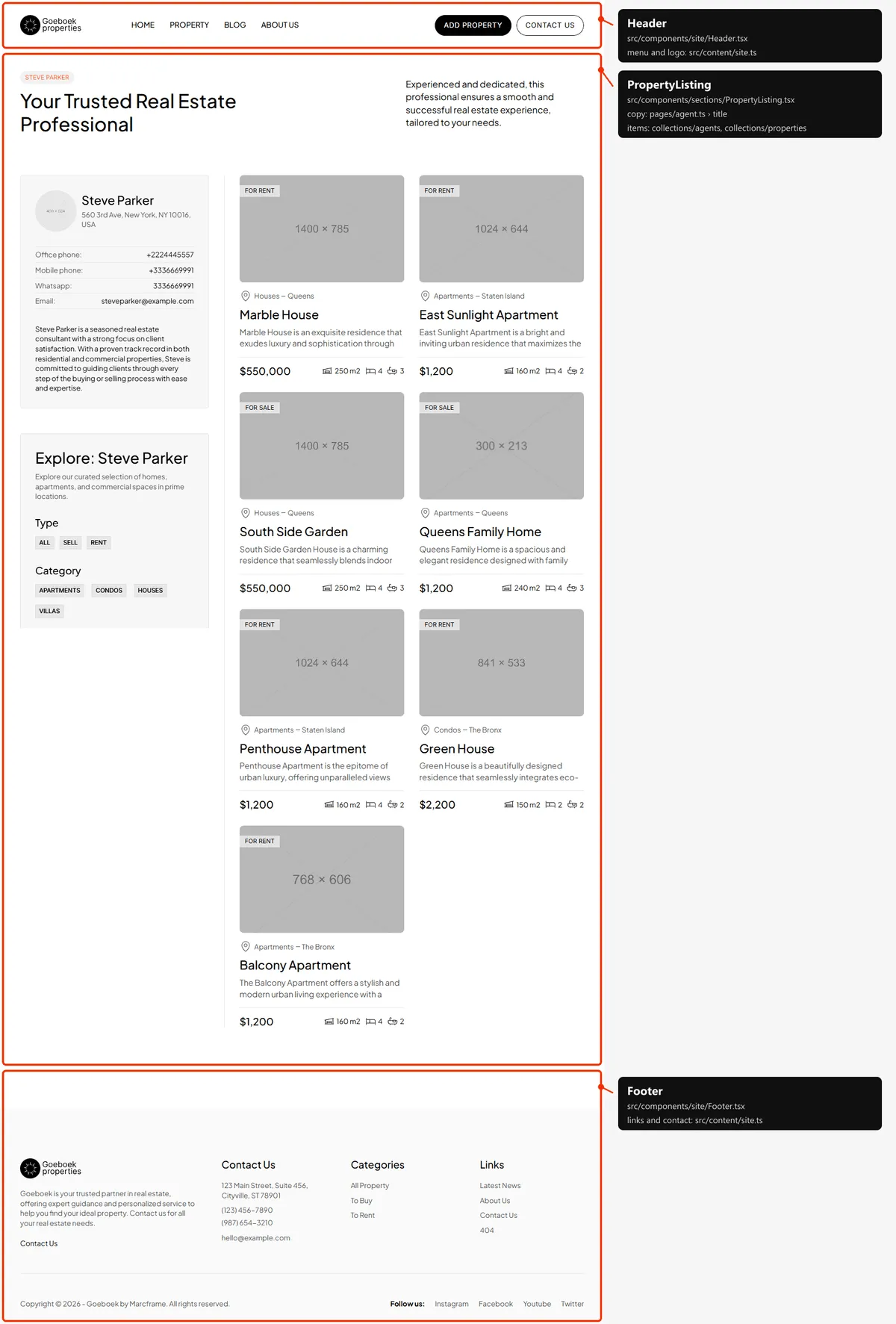
The same block with the agent’s name as its label, agent.ts’s title and text, and the agent’s card (photo, address,
office phone, mobile, WhatsApp, e-mail and text) above the filter (“Explore: Steve Parker”).
Property
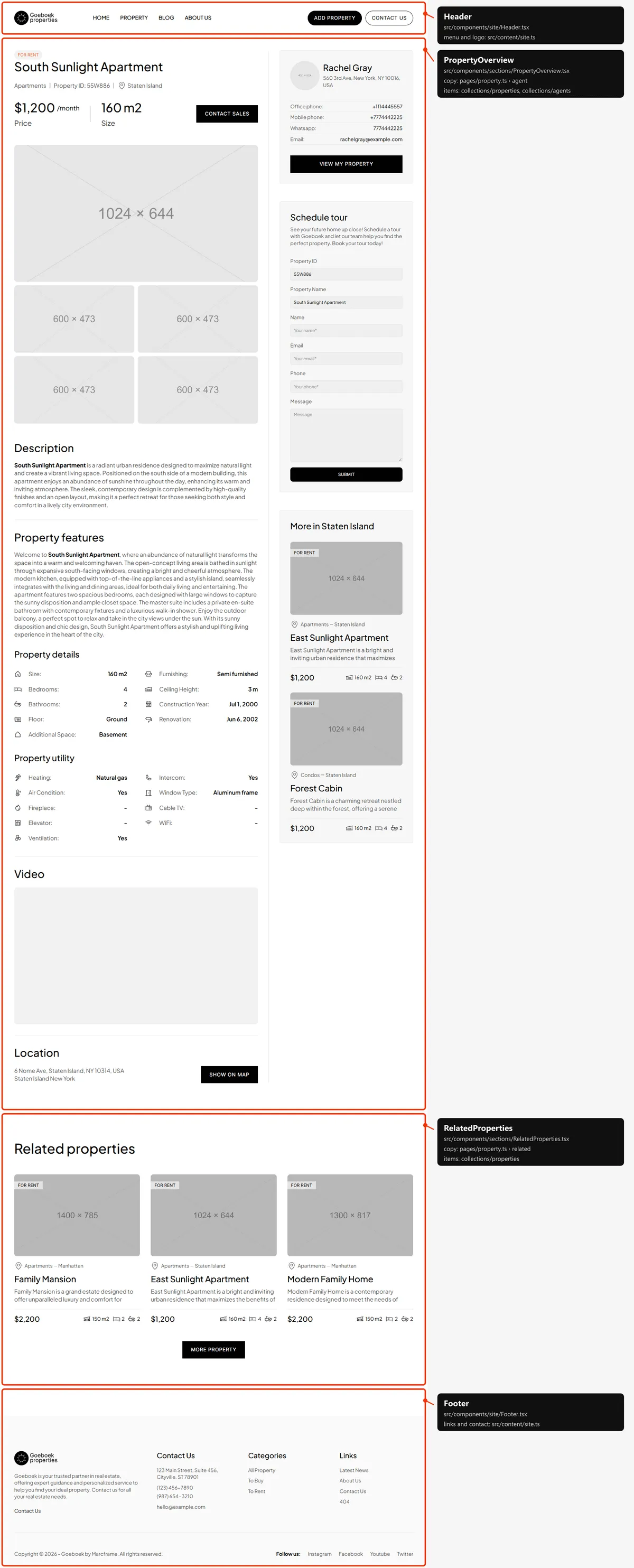
Section titled “Property”Two blocks: PropertyOverview (the type, the title, the meta line, price and size with “Contact Sales”, the main photo
over four gallery photos, Description, Property features, Property details, Property utility, Video and Location; in
the sidebar the agent, “Schedule tour” and “More in RelatedProperties (the other properties of the same category and type: three from 1200 px, four below, then “More
Property”). Everything but the labels (src/content/pages/property.ts) is the property’s entry in
src/content/collections/properties.ts and its agent’s in agents.ts.
One block: the title and every post, newest first, in four columns from 1440 px, three on laptops, two on tablets.
Blog post
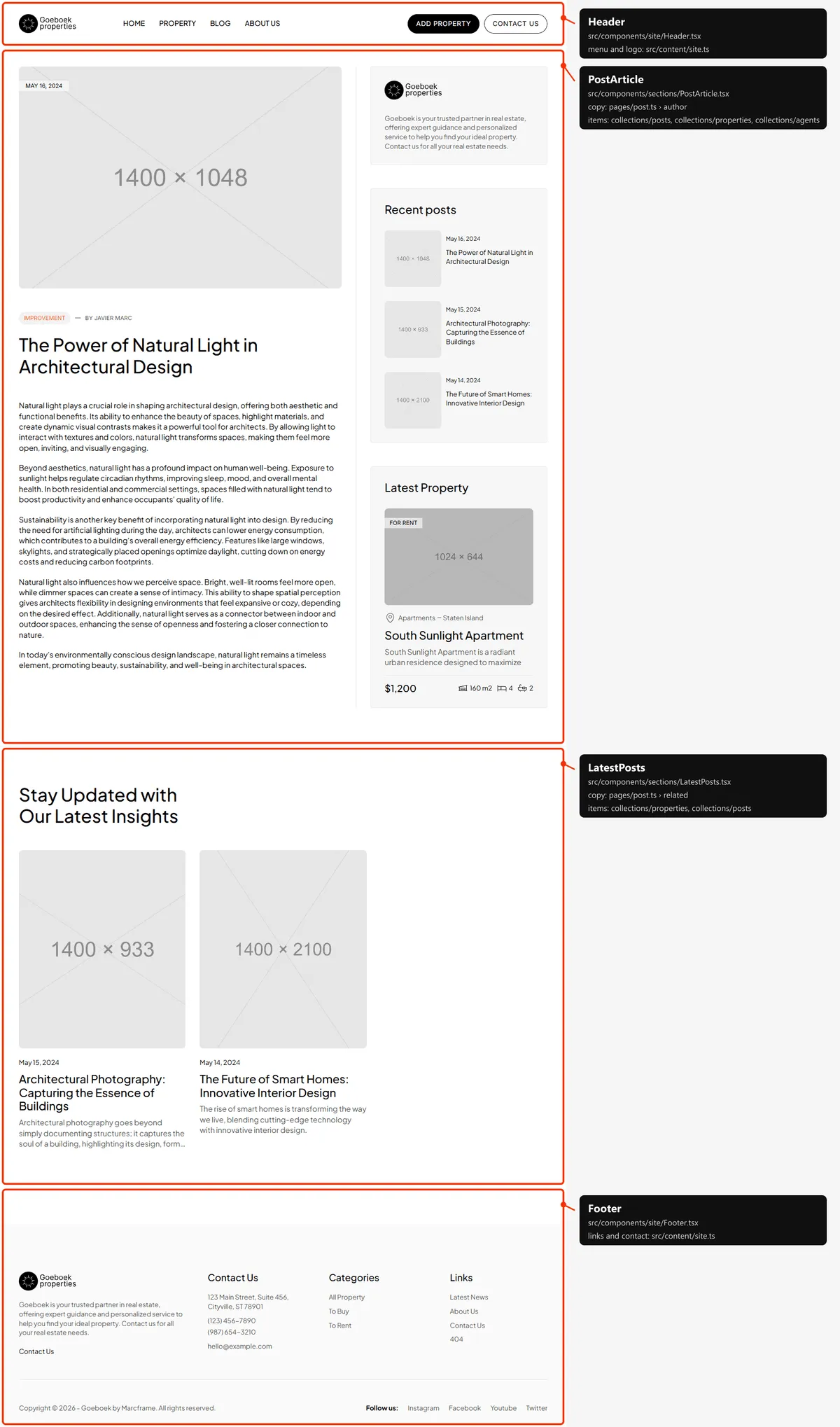
Section titled “Blog post”Two blocks: the article (the title, the date, category and author, the cover and the text, with the sidebar: the logo
and the about text, “Recent posts” and “Latest Property”) and the related posts (up to four other posts of the same
category, newest first; three on laptops and phones). The post is its entry in src/content/collections/posts.ts; the
labels are in src/content/pages/post.ts.
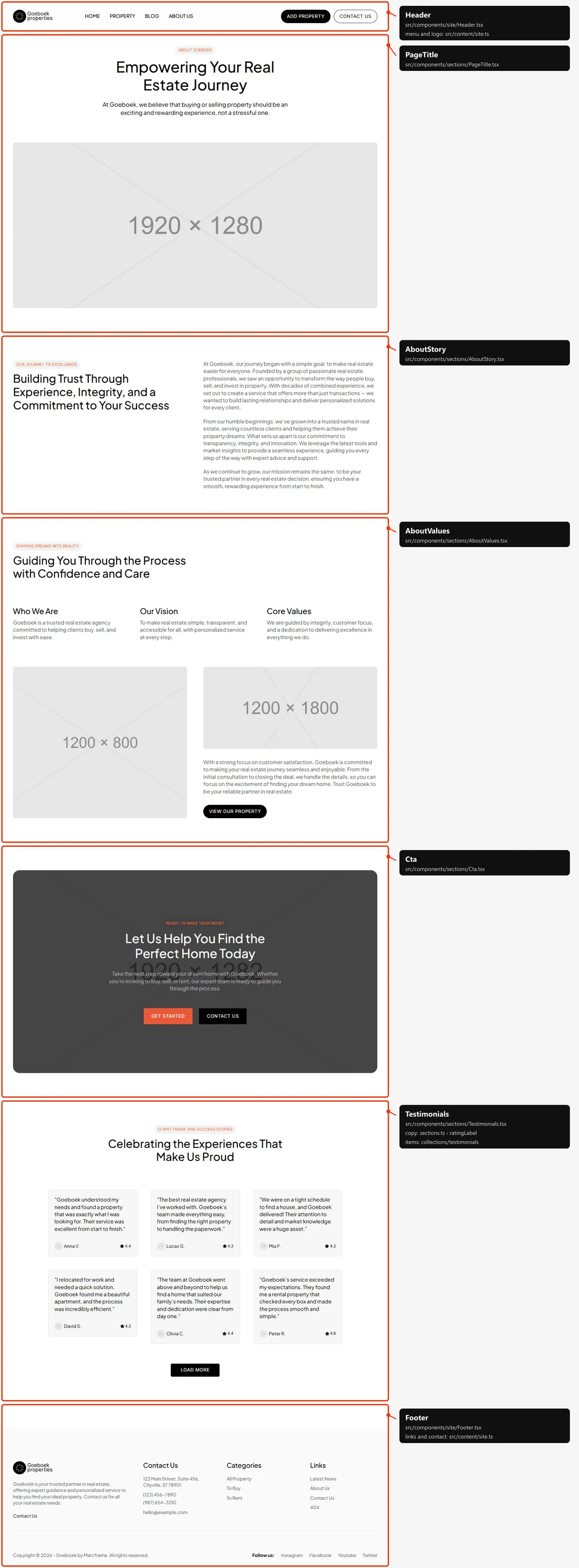
Five blocks: the page title over the photo, the story, the values with two photos, the call to action and the
testimonials (six, then “Load More”; four at a time below 1200 px). All the copy is in src/content/pages/about.ts.
Contact
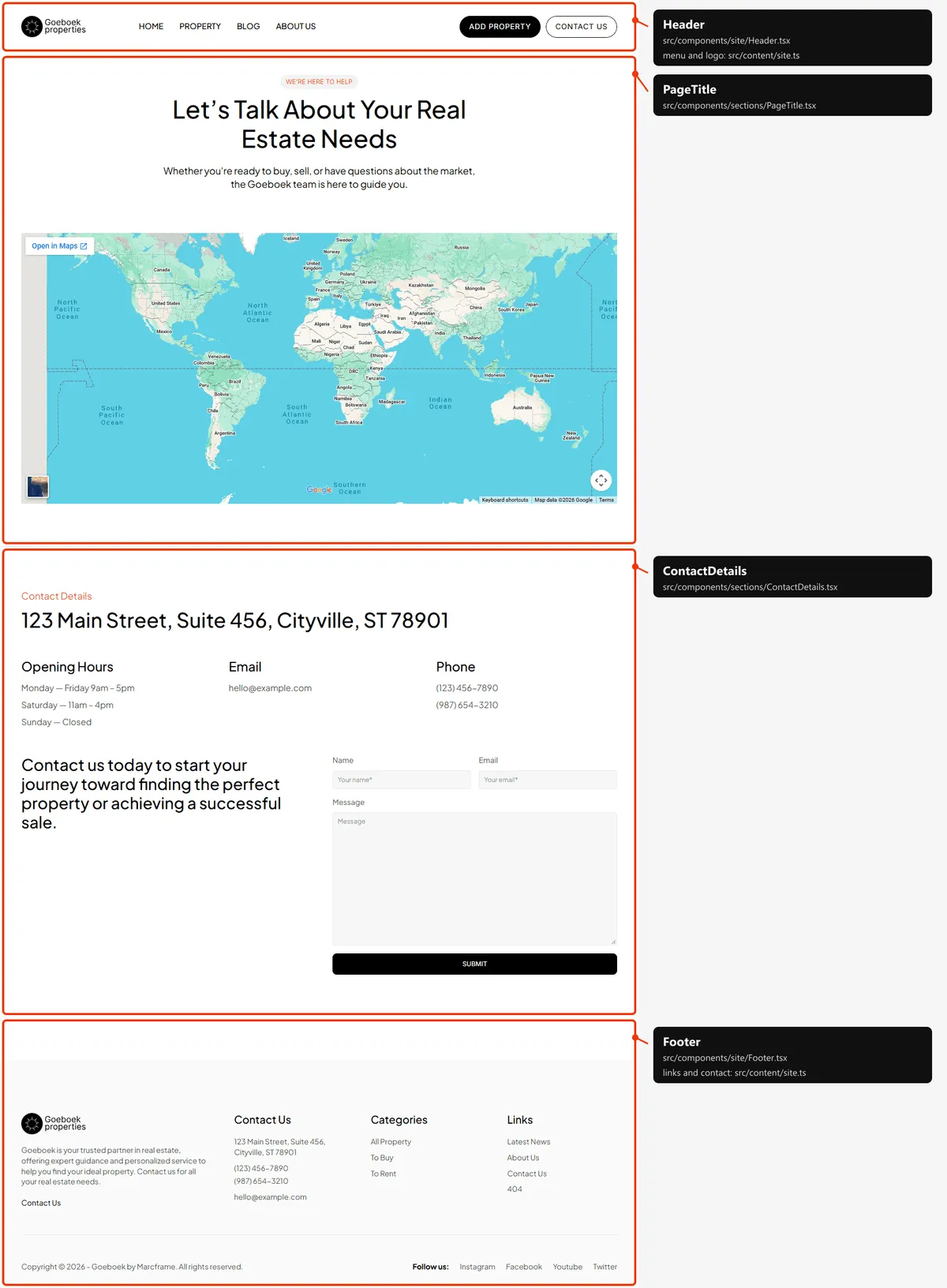
Section titled “Contact”Two blocks: the page title over the map (a Google Maps search for map.query in contact.ts) and the contact details
with the form. The address, hours, e-mail and phones are contact in src/content/site.ts.
Add property
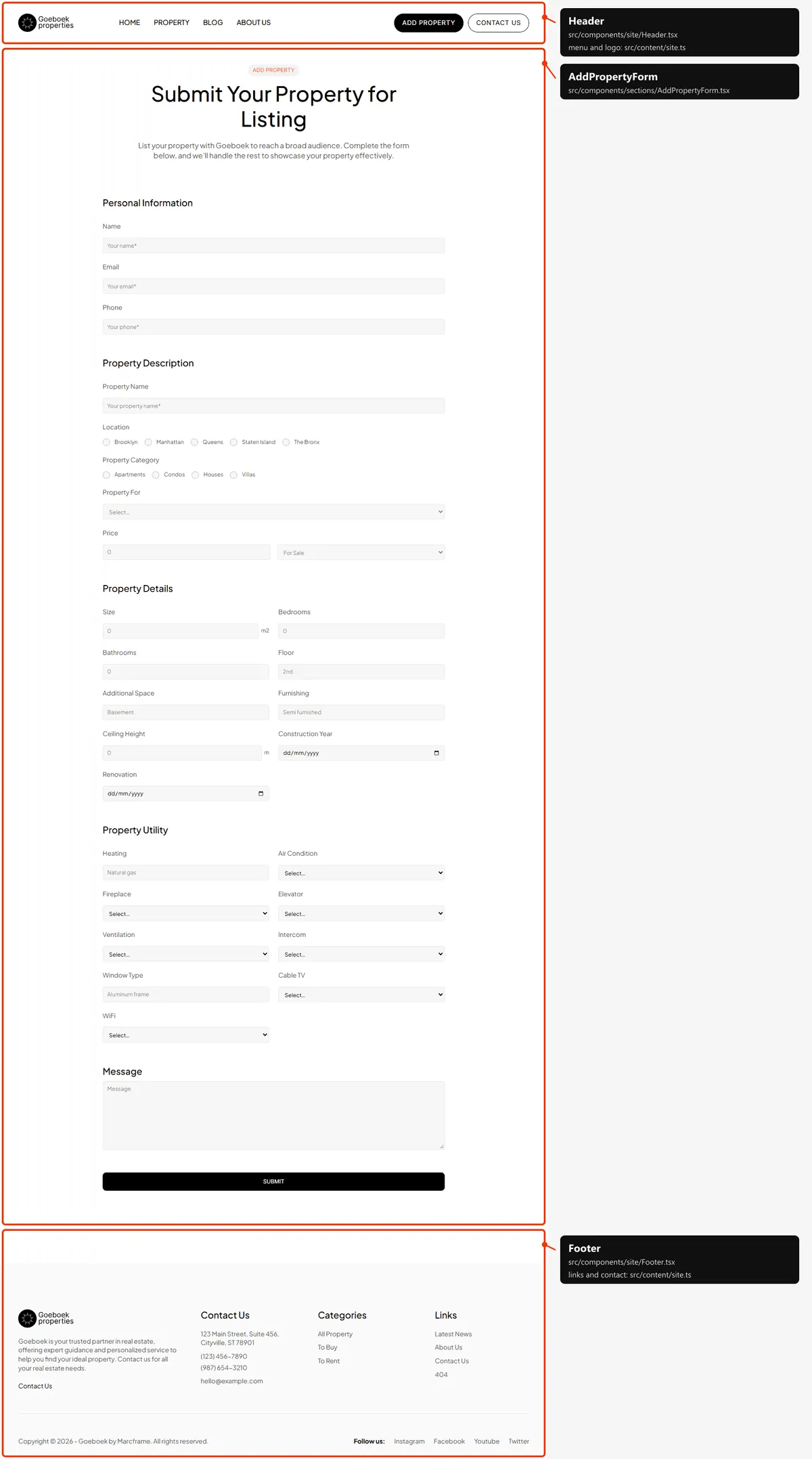
Section titled “Add property”One block: the page title and the form in five groups (Personal Information, Property Description, Property Details,
Property Utility, Message), all from src/content/pages/add-property.ts.
Tour scheduled and Property submitted
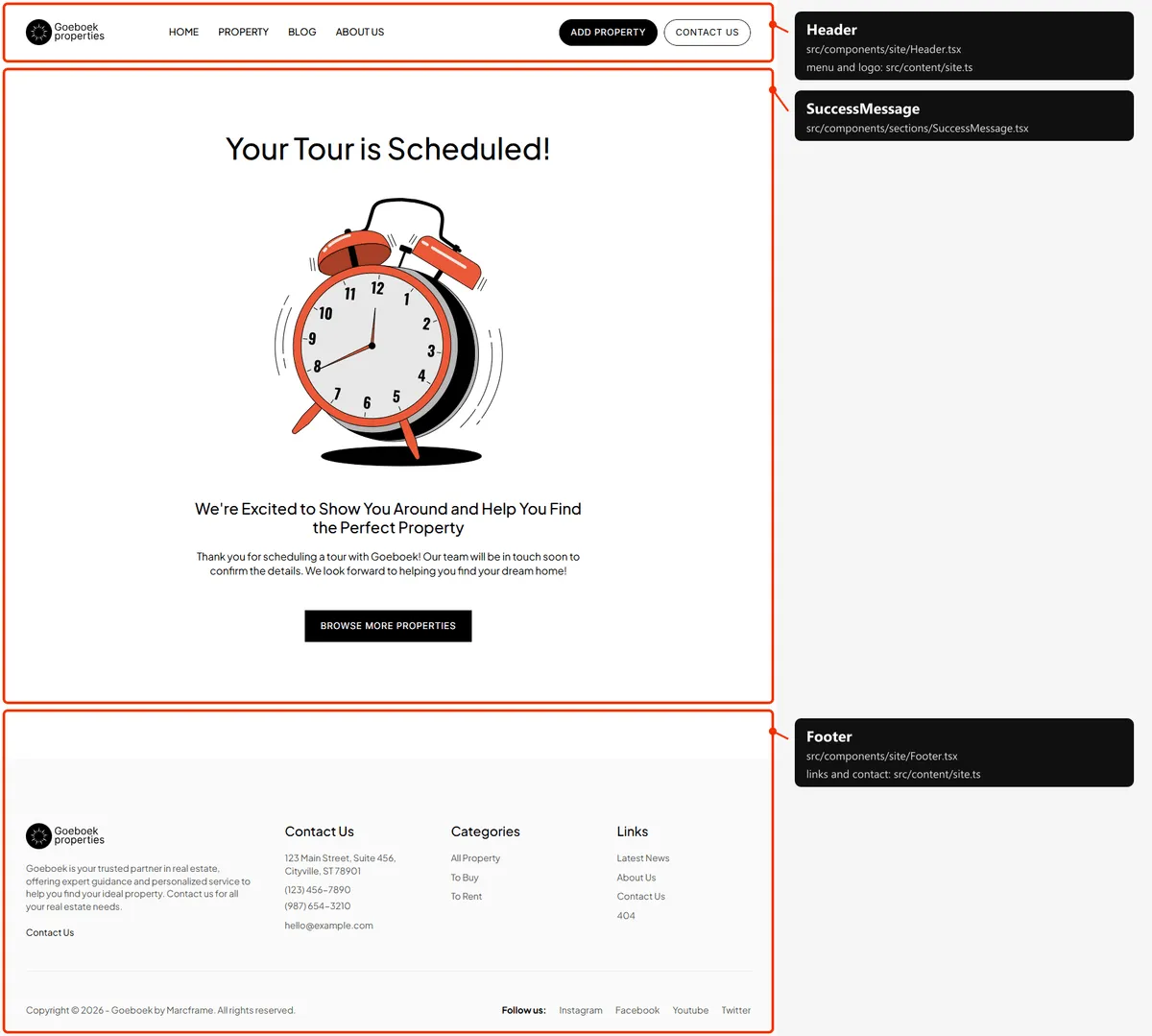
Section titled “Tour scheduled and Property submitted”One block, SuccessMessage: the title, the illustration, the subtitle and text, and the button. The two pages share it,
with their own copy in success.ts (tour, property) and illustration; the map shows Tour scheduled.
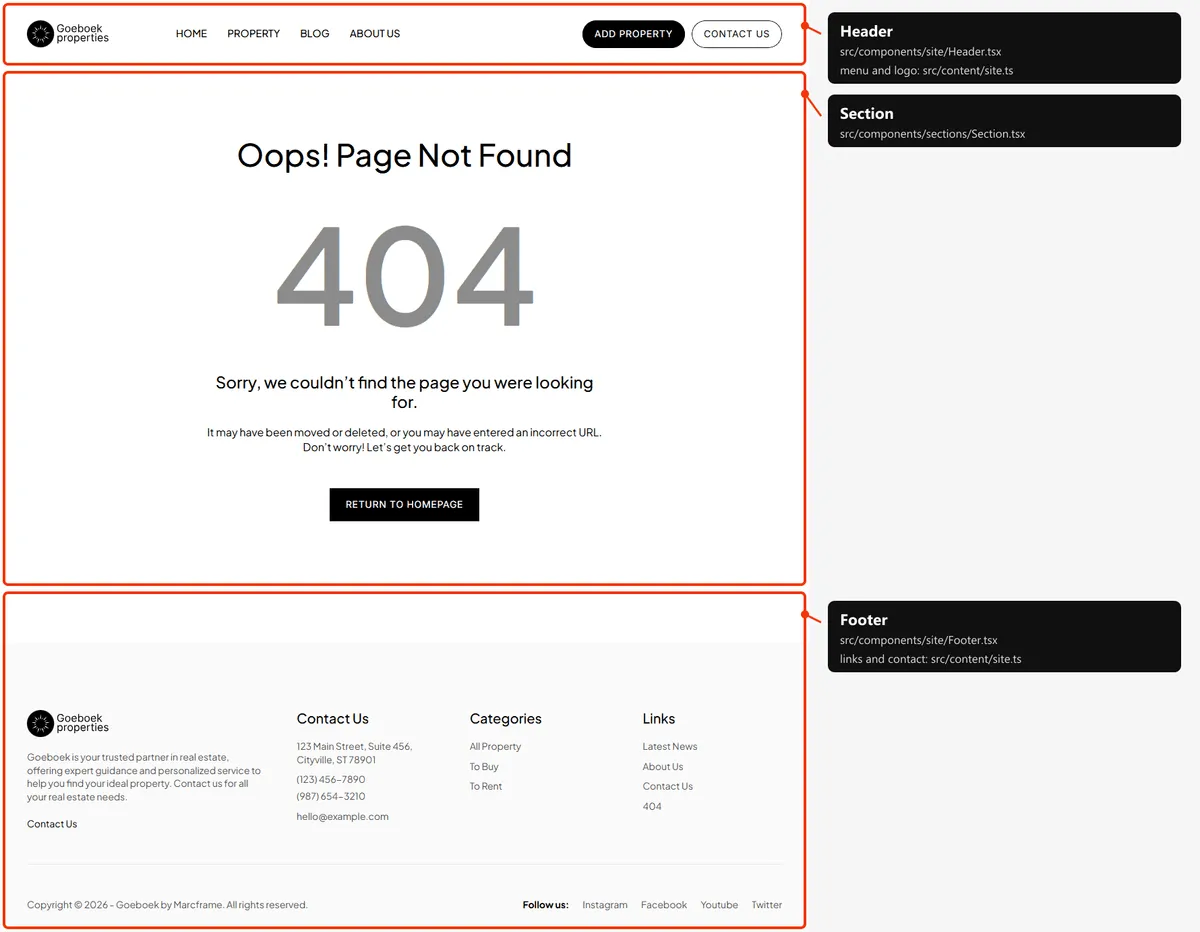
One block: the title, “404”, the two lines and “Return to Homepage”. The words are in src/content/pages/not-found.ts.
Reordering or removing a section
Section titled “Reordering or removing a section”Move the lines in the page file, or delete one. To take the call to action off About, delete <Cta cta={cta} /> in
src/app/about/page.tsx; its copy in sections.ts can stay (Home still uses it). Keep in step:
- Anchors. “More Details” in the hero links
/about#testimonials, theidof About’s testimonials: change both if you remove one. - The
<h1>. Each page has one: the hero’s title on Home, the title ofPropertyListing,PropertyOverview,PostArticle,PageTitle,BlogList,AddPropertyFormandSuccessMessage. Removing that section leaves the page without one.
Adding a section
Section titled “Adding a section”-
Add its copy to the page’s file, for example to
homeinsrc/content/pages/home.ts(and its field toHomePageinsrc/content/types.ts):"areas": { "label": "Neighbourhoods", "title": "Where We Work", "text": "Five boroughs, one team." }, -
Create
src/components/sections/Areas.tsx:import { Section, cn, text } from "@/design-system";export function Areas({ label, title, intro }: { label: string; title: string; intro: string }) {return (<Section bordered labelledBy="areas-title"><p className={cn(text.label, "text-accent")}>{label}</p><h2 id="areas-title" className={text.h2}>{title}</h2><p className={cn(text.body, "text-soft")}>{intro}</p></Section>);} -
Import it in
src/app/page.tsxand put<Areas label={home.areas.label} title={home.areas.title} intro={home.areas.text} />where it belongs. -
To link it from the header, give the
Sectionanidand add{ "label": "Areas", "href": "/#areas" }tonavigationinsrc/content/site.ts. The header holds four links and two buttons on laptops: with a fifth link, check it at 1200 px.
Adding a page
Section titled “Adding a page”-
Add the URL to
src/content/routes.ts:services: "/services",. -
Add its copy to
src/content/pages/services.ts:export const services = {meta: {title: "Services",description: "Buying, selling, renting and valuing property with Goeboek: what we do for you at every step of the way.",},title: "Our Services",text: "From the first viewing to the keys in your hand.",}; -
Create
src/app/services/page.tsx:import type { Metadata } from "next";import { services } from "@/content/pages/services";import { routes } from "@/content/routes";import { Section, cn, text } from "@/design-system";import { pageMeta } from "@/lib/meta";export const metadata: Metadata = pageMeta(routes.services, services.meta);export default function ServicesPage() {return (<main><Section labelledBy="services-title"><h1 id="services-title" className={text.number}>{services.title}</h1><p className={cn(text.large, "text-soft")}>{services.text}</p></Section></main>);}The layout adds the header and the footer around your
<main>. Give every page one<h1>. -
Link to it: add
{ "label": "Services", "href": "/services" }tonavigation(or a footer column) insrc/content/site.ts. -
Add
routes.servicesto thepathslist insrc/app/sitemap.ts.
Removing a page
Section titled “Removing a page”A property, an agent, a location, a category or a post: delete its entry in the collection (Editing the content).
A fixed page: delete its folder under src/app/, the links to it in site.ts and the copy, the route in routes.ts and
its line in src/app/sitemap.ts. npm run build then tells you about anything still using the route through routes.
Removing a thank-you page means the form that leads there needs another redirect, or none
(Forms).
Pages built from a collection
Section titled “Pages built from a collection”src/app/property/[slug]/page.tsx builds one page per property:
export const dynamicParams = false;
export async function generateStaticParams() {  return (await getProperties()).map((item) => ({ slug: item.slug }));}
Add a property to src/content/collections/properties.ts, and its page, its cards, its place in the listings and its
sitemap entry appear on the next build. dynamicParams = false means an address that isn’t in the collection shows the
404 page. The agents, locations, categories and posts work the same way, and the two Type pages are built from the list
["sell", "rent"] in src/app/type/[type]/page.tsx.
The 404 page
Section titled “The 404 page”src/app/not-found.tsx, with its copy in src/content/pages/not-found.ts. Next.js shows it for any unknown address, and
for a slug that doesn’t exist, with a 404 status and noindex, nofollow, like the style guide. The “404” is sized to a
share of the column’s width (as the original design does).
The header
Section titled “The header”- Sticky at the top of every page, and the same everywhere: the logo, the four links, “Add Property” and “Contact us” in one row from 1200 px; on tablets the links are centred and “Contact us” is left out.
- Phones: the small logo and the “Menu” button; it opens the links under the logo row with the two buttons on the last
row, and turns into “Close”. The logo and every link close it (
src/components/site/Header.tsx). - The links are
navigationinsrc/content/site.ts, the buttonsheaderActions.
The footer
Section titled “The footer”src/components/site/Footer.tsx, on every page: the logo, the text and “Contact Us”; the Categories and Links columns
(footer.columns) and Contact Us (the address, phones and e-mail from contact); then a line, the copyright with the
current year and “Follow us:” with the social links. Its texts are footer, contact and socials in
src/content/site.ts.
Search engines
Section titled “Search engines”- Sitemap:
src/app/sitemap.tsbuildssitemap.xmlfromroutes.tsand the collections: Home, the listings, every property, the blog and its posts, About, Contact, Add property and the two thank-you pages: 55 addresses in the demo. The three empty default listings, the 404 page and the style guide are left out. - Robots:
src/app/robots.tsbuildsrobots.txt, which allows everything and points at the sitemap. Both usesite.url, so set your domain before publishing. - Per page: every indexable page gets a title, a description, a canonical link and an
og:urlfrompageMeta(src/lib/meta.ts). Home takessite.titleandsite.description; the other pages theirmeta(with{name}for a location, category or agent). A property’s and a post’s description is itsexcerpt; properties, posts and agents with a photo share it as a large card, and a post is shared as an article with its date. Home and the other pages have no share image, as in the original design. A title that would be longer than 60 characters with| Goeboekappended is shown without the suffix. - One
<h1>per page: the hero’s title on Home, the listing’s title, a property’s or a post’s title, the page title of the other pages. - Not indexed: the style guide and the 404 page (
noindex, nofollow), the three empty default listings (noindex, follow).