Pages and sections — Compose Digi Next.js
A page is a small file that picks sections and hands them content. src/app/projects/page.tsx is the whole Projects page:
export const metadata: Metadata = pageMeta(routes.projects, { title: projectsPage.meta.title, description: projectsPage.meta.description });
export default async function ProjectsPage() {  const projects = await getProjects();  return (    <>      <PageHeroSection hero={projectsPage.hero} />      <ProjectsListSection list={projectsPage.list} projects={projects.map(toProjectCard)} cursor={cursorLabels.project} />    </>  );}
pageMeta(route, meta)gives the page its browser title, description, canonical link and share image.getProjects()reads the collection (see Editing the content).toProjectCardturns each project into what a card shows (src/lib/to-ui.ts).- The sections render them: the top block with the page’s title, then every project as a card with “Load More”.
The pages
Section titled “The pages”12 kinds of page and 47 addresses in the demo. Every address is in src/content/routes.ts.
| Page | Address | Page file | Copy (src/content/pages/) |
Items it shows |
|---|---|---|---|---|
| Home | / |
src/app/page.tsx |
home.ts |
the first six services, the first four projects in the strip and five more as cards, the three newest posts |
| About | /about |
src/app/about/page.tsx |
about.ts (with the team) |
the first three job openings |
| Services | /services |
src/app/services/page.tsx |
services.ts |
every service; the testimonials of the first three projects |
| Service | /services/<slug> |
src/app/services/[slug]/page.tsx |
service.ts |
one service and its plans; three other services (four on tablets) |
| Projects | /projects |
src/app/projects/page.tsx |
projects.ts |
every project, a page at a time |
| Project | /projects/<slug> |
src/app/projects/[slug]/page.tsx |
project.ts |
one project, the services it used; three other projects (two on tablets) |
| Careers | /careers |
src/app/careers/page.tsx |
careers.ts |
every job opening, four at a time |
| Job opening | /careers/<slug> |
src/app/careers/[slug]/page.tsx |
careers.ts (job) |
one opening |
| Blog | /blog |
src/app/blog/page.tsx |
blog.ts |
every post, a page at a time |
| Post | /blog/<slug> |
src/app/blog/[slug]/page.tsx |
post.ts |
one post, the posts before and after it, three others |
| Contact | /contact |
src/app/contact/page.tsx |
contact.ts |
every service (as the form’s checkboxes) |
| 404 | any unknown address | src/app/not-found.tsx |
not-found.ts |
— |
The style guide (/style-guide, src/app/style-guide/) is a page too, for you: it is hidden from search engines and
linked from nowhere.
To change an address, rename its folder in src/app/ and its entry in routes.ts, and search the content for the old
address: links written as text aren’t checked (removing a page).
The sections you can use
Section titled “The sections you can use”In src/components/sections/, one file each (the four image blocks of a project page share ProjectImageSections.tsx).
Each takes its copy from a page file and its items from a collection.
| Section | Used on |
|---|---|
HomeHeroSection, HomeAboutSection, QuoteSection, HomeServiceSection, HomeProjectSection |
Home |
BlogSection (three post cards under a title) |
Home (“Latest Blog”) |
PageHeroSection (the label, the title, the lead, the social buttons and “Scroll to Explore”) |
About, Services, a service, Projects, Blog |
AboutIntroSection, AboutVideoSection (the video, the figures and the client logos), AboutTeamSection (the team and “Open Positions”) |
About |
ServicesListSection, ProcessSection, ServicesCtaSection, TestimonialSection |
Services |
ServiceImageSection, ServiceDetailsSection (the texts and the plan card), OtherServicesSection |
A service |
ProjectsListSection |
Projects |
ProjectHeroSection, ProjectDetailsSection (Overview, Process, Outcome), ProjectParallaxImageSection, ProjectSlideImageSection, ProjectGrowImageSection, ProjectTestimonialSection, MoreProjectsSection |
A project |
CareersSection |
Careers |
JobSection |
A job opening |
BlogListSection |
Blog |
PostMainSection (the title, the cover, the article, Prev and Next), MoreBlogSection |
A post |
ContactSection (the title and the form) |
Contact |
ProjectsCta (the dark invitation box with “Get in touch” and “See more projects”) sits inside HomeProjectSection and
MoreProjectsSection; it is a part, not a section. <Divider /> (from the design system) draws the thin line between
some sections. The 404 page is written in src/app/not-found.tsx itself.
What each collection feeds
Section titled “What each collection feeds”Several pages read the same items, so a change in a collection shows everywhere:
| Item | Shown on |
|---|---|
| A service | Its own page; a row of Home’s list (the first six); a card on Services and under the other services; a tag above the title of the projects that name it; a checkbox of the contact form; a name in the footer’s moving rows (the first eight) |
| A project | Its own page; Home’s strip (the first four, with the company and the first service) and list; a card on Projects and under the other projects; on Services, its client quote (the first three projects) |
| A post | Its own page; Home’s “Latest Blog” (the first three); a card on Blog; Prev / Next and “More Blog” on the other posts |
| A job opening | Its own page; About’s “Open Positions” (the first three); a row on Careers |
The numbers are content: services.count, projects.tickerCount / listOffset / listCount and blog.count in
home.ts, positions.count in about.ts, testimonials.count in services.ts, others.count in service.ts,
more.count in project.ts and post.ts.
How the pages link to each other
Section titled “How the pages link to each other”The menu holds Home, Services, Projects, About and Blog, followed by “Contact Us” and the round arrow; the logo leads home. The other pages are reached like this:
| Page | Linked from |
|---|---|
| Home | The logo, the menu, the footer’s Links, “Back to homepage” (404) |
| About | The menu, the footer, “More about us” (Home) |
| Services | The menu, the footer, “Our Services” (Home hero), “More Services” (Home), “All Services” (a service page) |
| A service | Its row on Home, its card (Services, a service page), the tags of a project |
| Projects | The menu, the footer, “Our Projects” (Home, About), “See more projects” (the invitation box), “See our Works” (404) |
| A project | Its card: Home’s strip and list, Projects, “More Projects” |
| Careers | The footer’s Support, “See all positions” (About), “Back to Career page” (a job opening) |
| A job opening | Its row: About’s “Open Positions” and Careers |
| Blog | The menu, the footer’s Support |
| A post | Its card: Home’s “Latest Blog”, Blog, “More Blog”; Prev and Next |
| Contact | “Contact Us” and the round arrow (header), the footer’s round button and Support column, “Contact us” (About), “Get in touch” (the invitation box), “Drop us a line” (Services), “Book an intro call” (a service’s plan) |
“Book a call” (Home hero and footer) leads to the booking page in bookCallLink (Editing the content).
Page maps
Section titled “Page maps”Every page type with each section outlined and labelled: the component that renders it, the file to edit, and where its
copy (src/content/pages/*.ts, src/content/site.ts) and items (src/content/collections/*.ts) come from. Header and
footer take their links and details from src/content/site.ts. Photos are the placeholders of the download; the thin
lines between some sections are dividers, not sections.
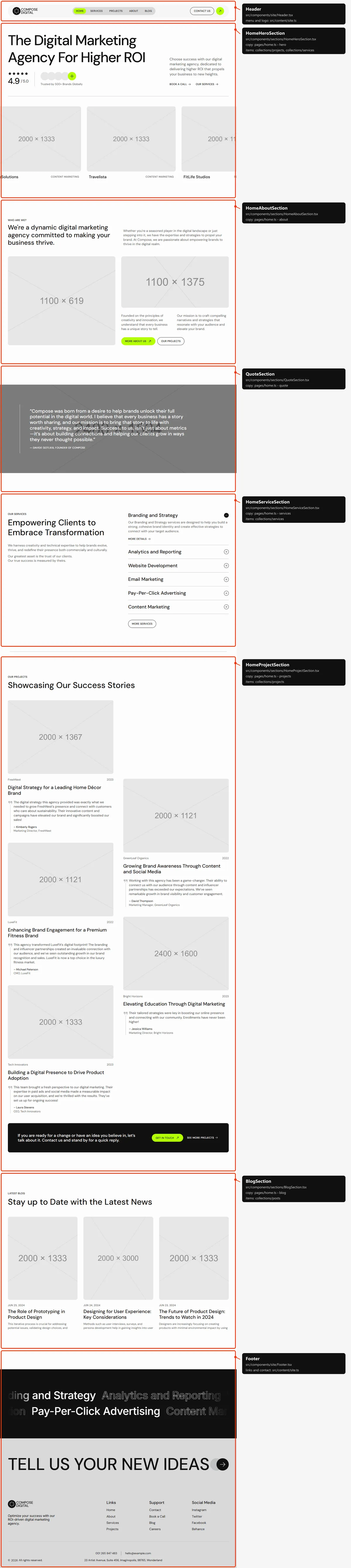
Six sections, top to bottom: the hero (the title, the rating, the lead, “Book a call” and “Our Services”, then the strip of
the first four projects); “Who are we?” (the title, the lead, two photos, two paragraphs and two buttons); the founder’s
quote over a photo; “Our services” (the intro and the first six services as rows that open one at a time, “More
Services”); “Our Projects” (five projects as cards in two staggered columns, then the invitation box); “Latest Blog” (the
three newest posts). The words are in src/content/pages/home.ts.
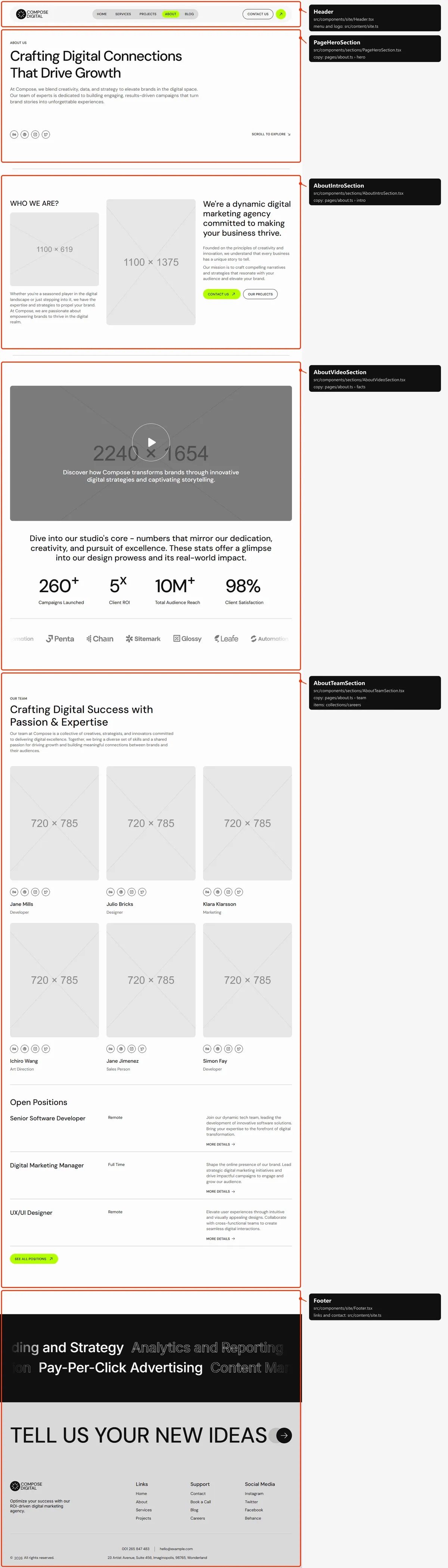
Four sections: the top block (“Crafting Digital Connections That Drive Growth”, the social buttons and “Scroll to
Explore”); “WHO WE ARE?” (two photos, the statement, two paragraphs and two buttons); the video, the four figures and the
moving client logos; “Our Team” (six members with their social buttons, then “Open Positions” with the first three
openings and “See all positions”). The words and the team are in src/content/pages/about.ts, the openings in
src/content/collections/careers.ts.
Services
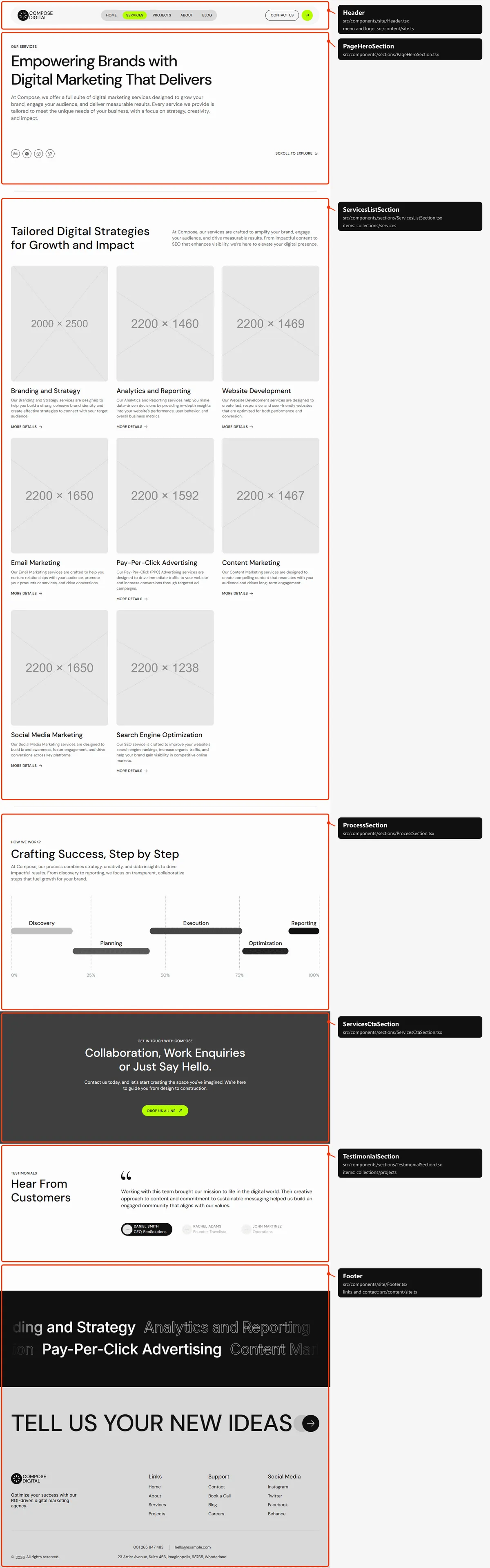
Section titled “Services”Five sections: the top block; every service as a card with its photo; “How we work?” with the process chart; the call to
action over a photo (“Drop us a line”); “Hear From Customers” (the client quotes of the first three projects). The words
are in src/content/pages/services.ts, the services in src/content/collections/services.ts.
Service
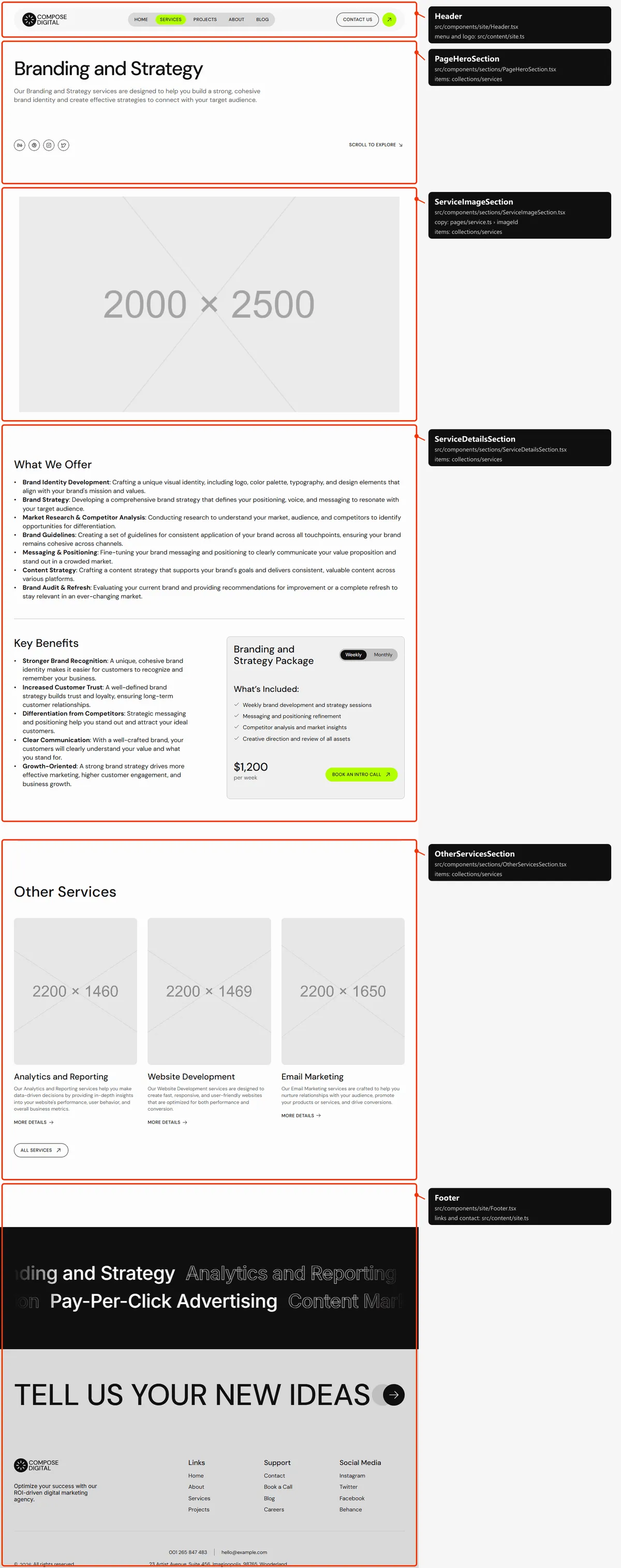
Section titled “Service”Four sections: the top block with the service’s name and summary; its photo, growing into place; “What We Offer”, then
“Key Benefits” beside the plan card (the Weekly / Monthly switch, “What’s Included:”, the price and “Book an intro call”);
“Other Services” (three others, four on tablets, and “All Services”). Everything but the fixed words
(src/content/pages/service.ts) is the service’s own entry in src/content/collections/services.ts.
Projects
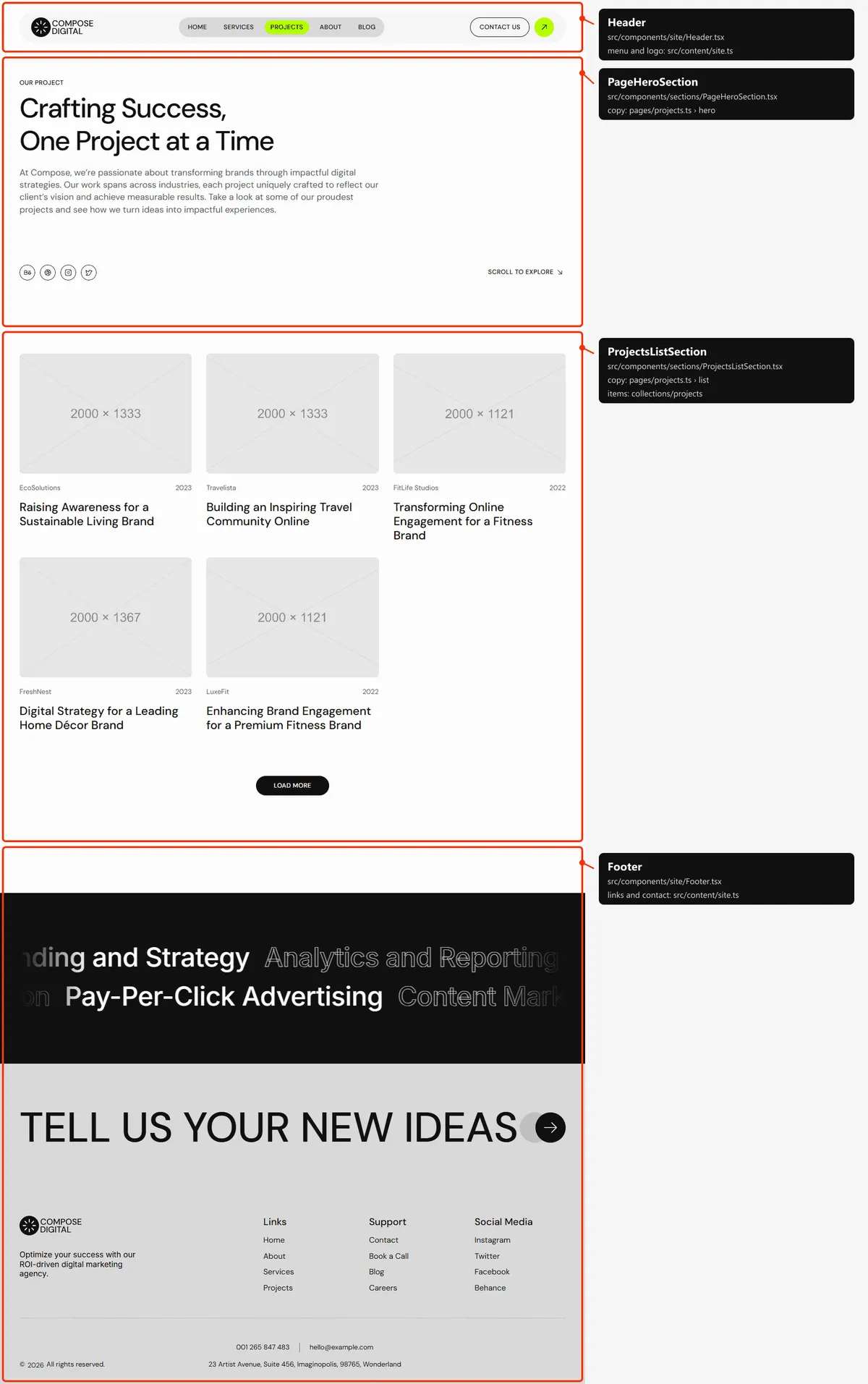
Section titled “Projects”Two sections: the top block (“Crafting Success, One Project at a Time”); every project as a card, five at a time on
desktops (four on tablets, three on phones), with “Load More”. The words are in src/content/pages/projects.ts, the
projects in src/content/collections/projects.ts.
Project
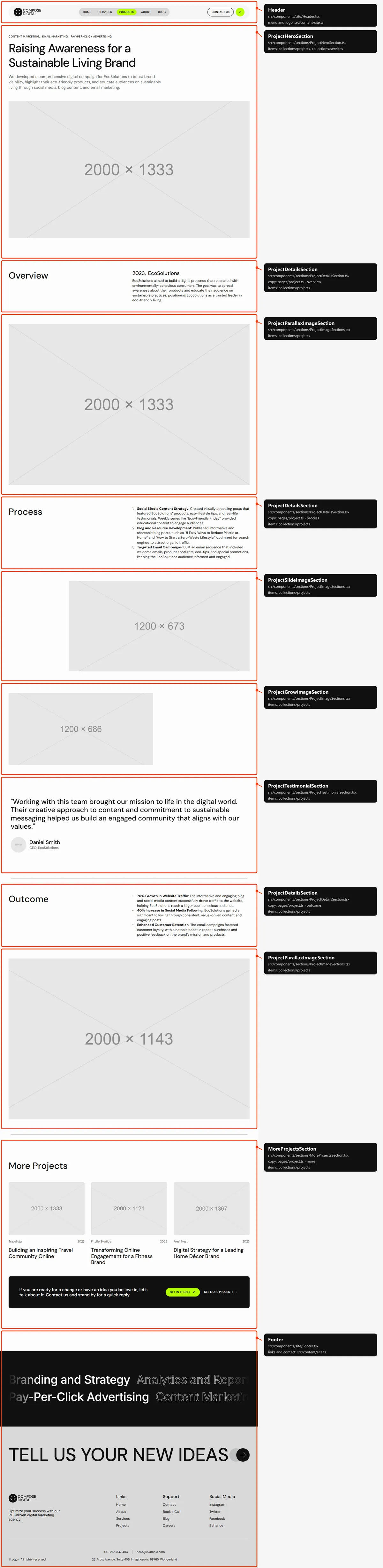
Section titled “Project”Ten sections: the top block (the services as links, the title, the summary and the cover); “Overview” (the year, the
client and the text); a big photo; “Process”; a photo sliding in from the right; a photo growing on the left; the client’s
words; “Outcome”; the last big photo; “More Projects” (three others and the invitation box). Everything but the headings
(src/content/pages/project.ts) is the project’s own entry in src/content/collections/projects.ts. The map shows the
photos at their final place; on the site they move into it as the page scrolls.
Careers
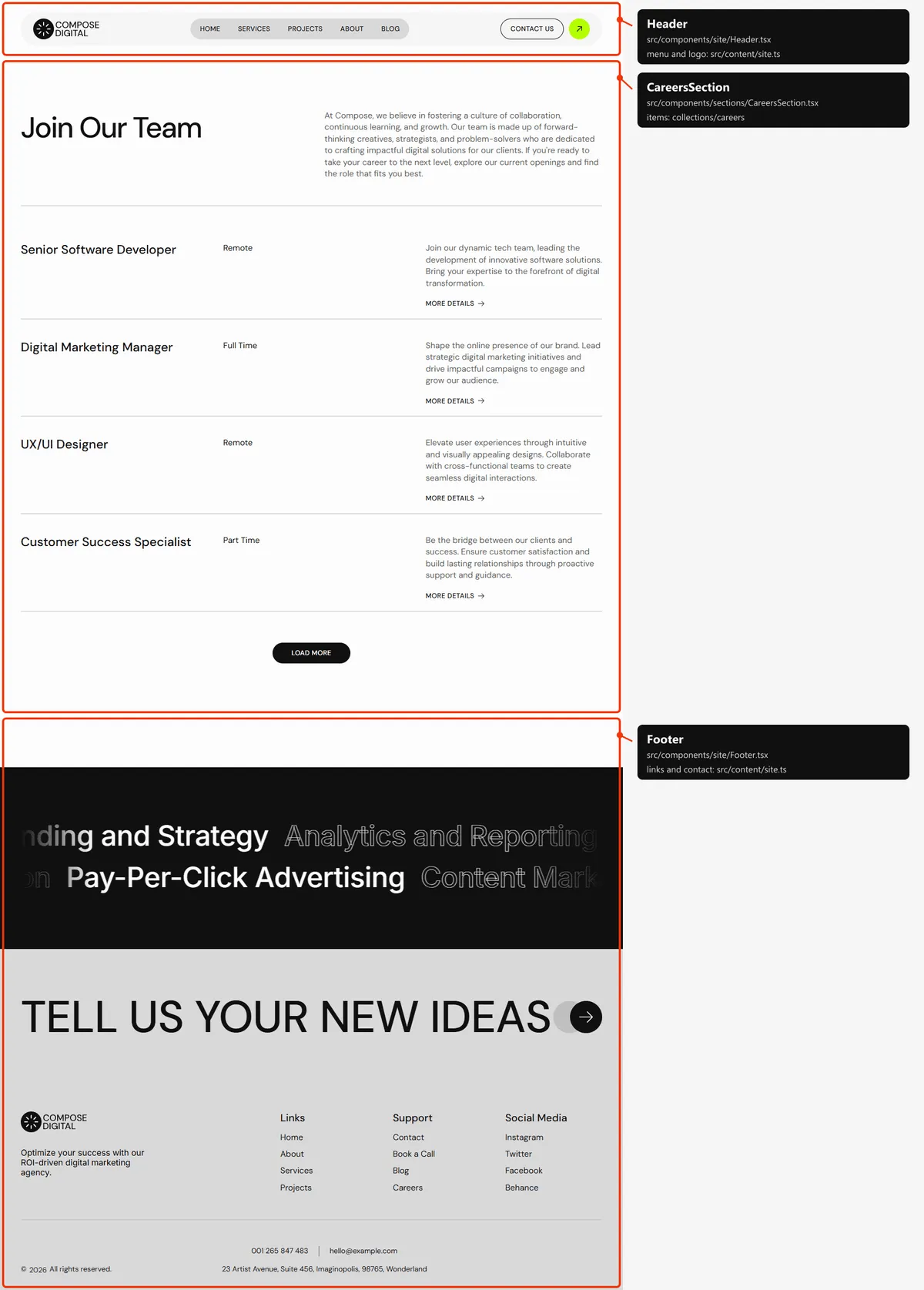
Section titled “Careers”One section: “Join Our Team” with its lead, then every opening as a row (the title, the type, the summary and “More
Details”), four at a time with “Load More”. The words are in src/content/pages/careers.ts, the openings in
src/content/collections/careers.ts.
Job opening
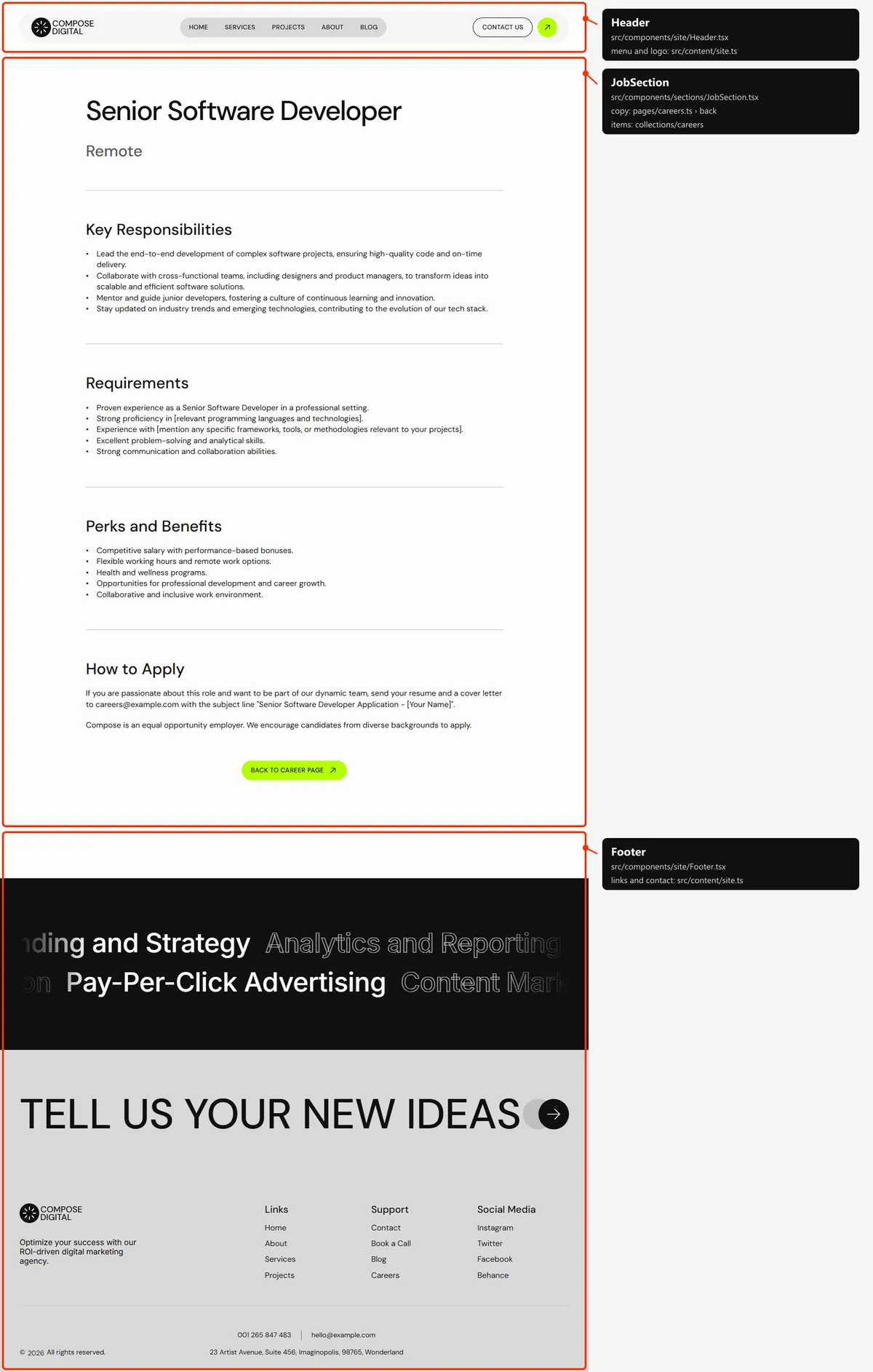
Section titled “Job opening”One section: the title and the type, then “Key Responsibilities”, “Requirements”, “Perks and Benefits” and “How to Apply”,
and “Back to Career page”. The headings are job in src/content/pages/careers.ts; the rest is the opening’s own entry
in src/content/collections/careers.ts.
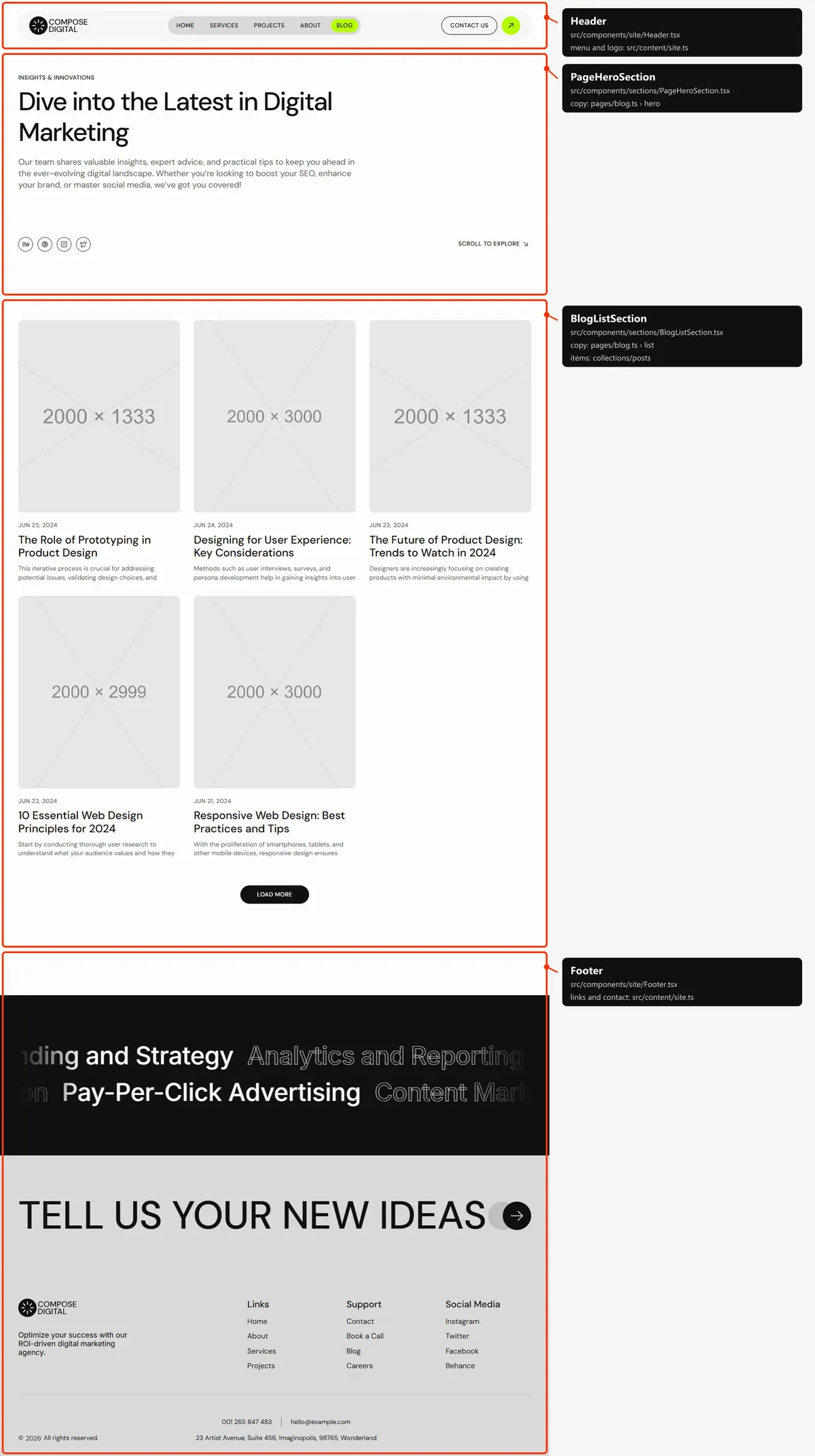
Two sections: the top block (“Dive into the Latest in Digital Marketing”); every post as a card, five at a time on desktops
(four on tablets, three on phones), with “Load More”. The words are in src/content/pages/blog.ts, the posts in
src/content/collections/posts.ts.
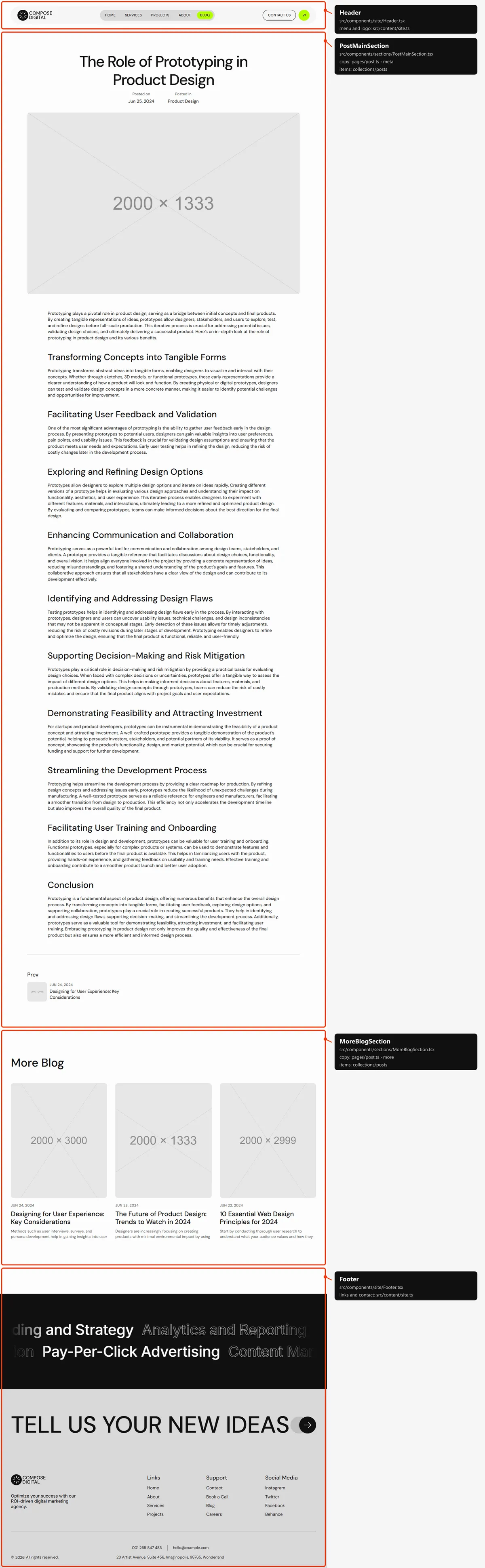
Two sections: the article (the title, “Posted on” and “Posted in”, the cover, the text, then Prev and Next); “More Blog”
(three other posts). Everything but the fixed words (src/content/pages/post.ts) is the post’s own entry in
src/content/collections/posts.ts.
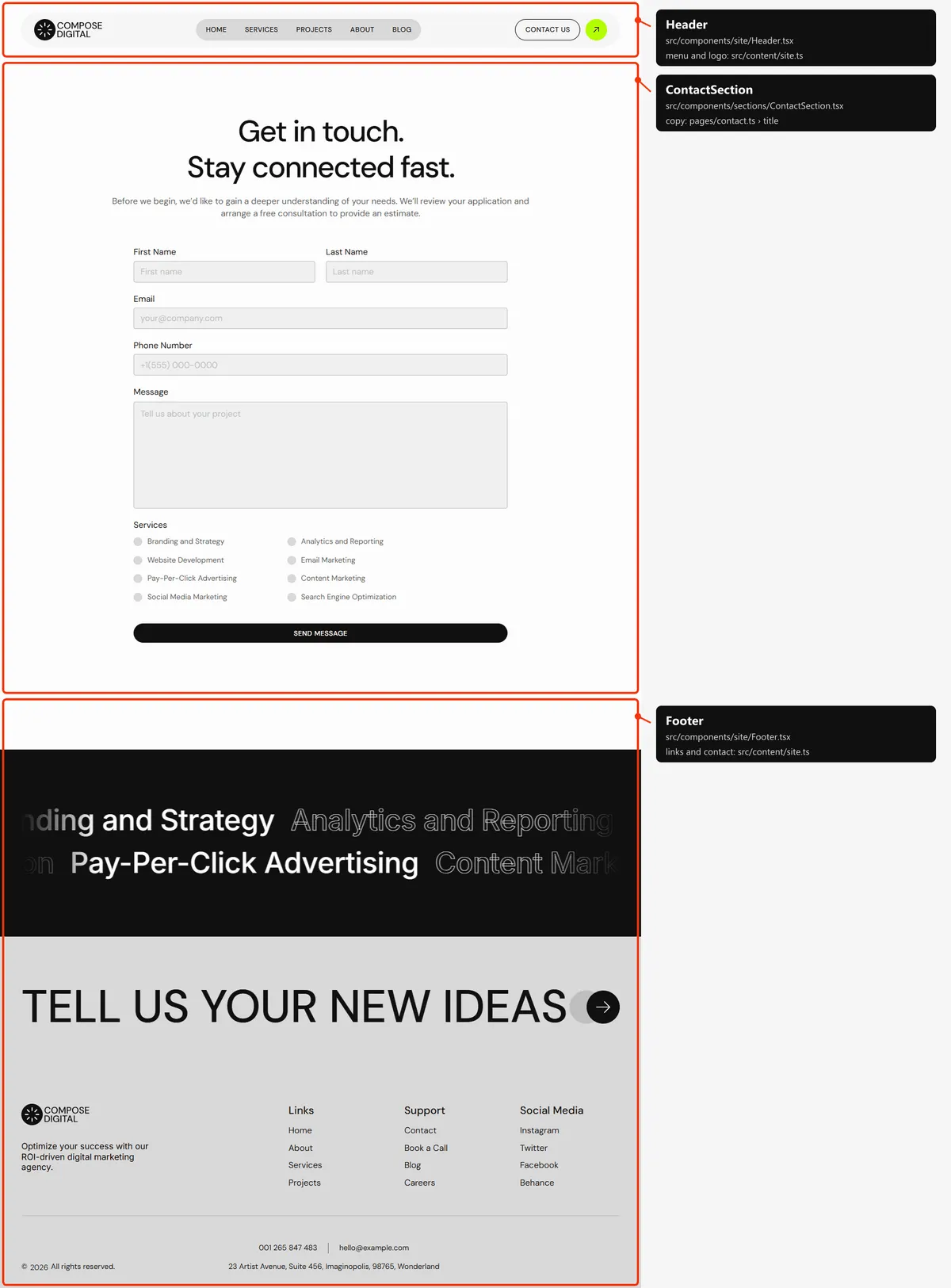
Contact
Section titled “Contact”One section: “Get in touch. Stay connected fast.”, the lead and the form, with a checkbox for every service. The words
are in src/content/pages/contact.ts (Forms).
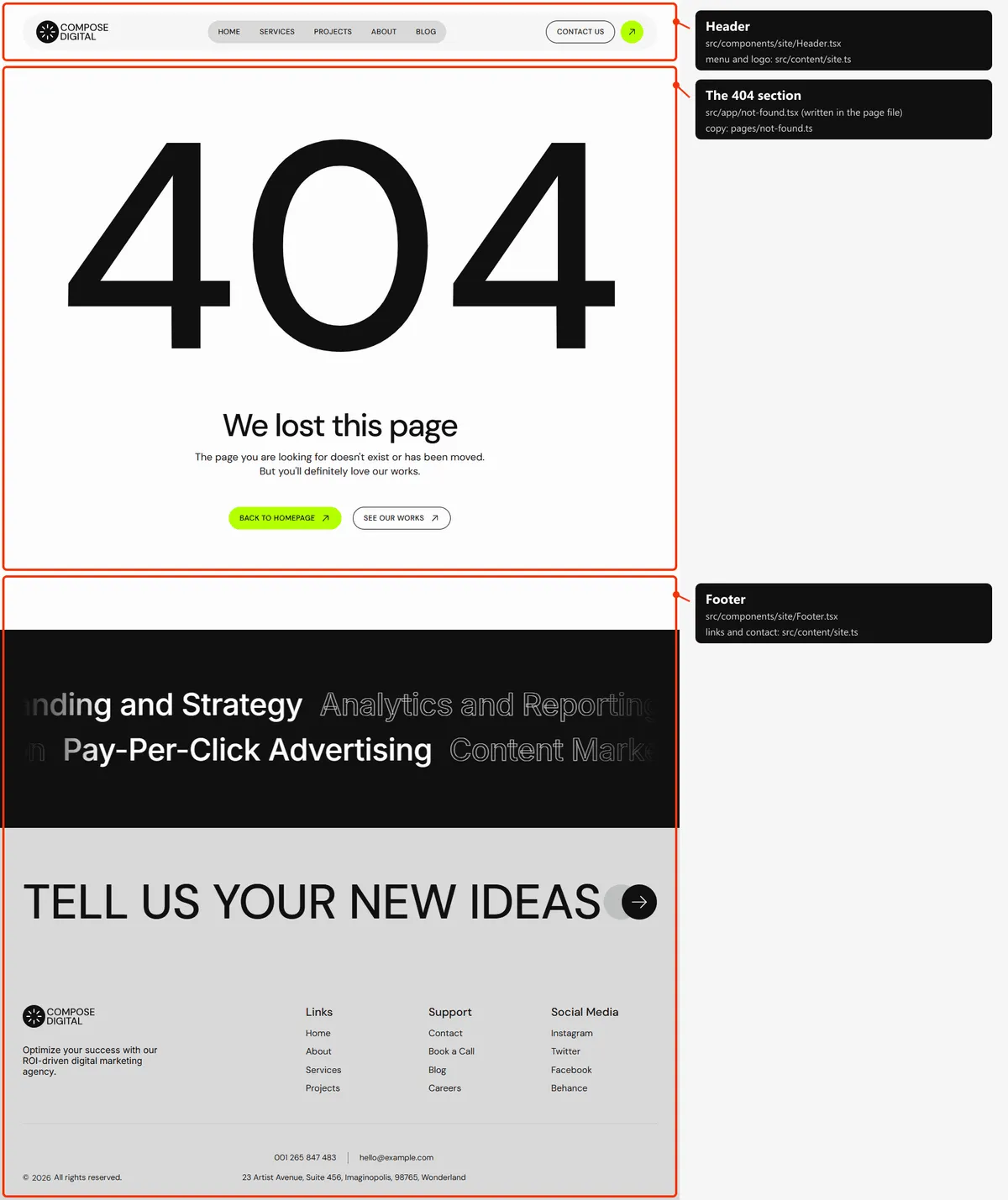
One section, written in the page file itself: the big “404”, “We lost this page”, two lines, “Back to homepage” and “See
our Works”. The words are in src/content/pages/not-found.ts.
Reordering or removing a section
Section titled “Reordering or removing a section”Move the lines in the page file, or delete one. To take the founder’s quote off the home page, delete
<QuoteSection … /> from src/app/page.tsx. Delete a <Divider /> with its section when the line would end up doubled
or alone.
A few blocks are parts of a bigger section, so they go inside its file: the invitation box (<ProjectsCta>) inside
HomeProjectSection.tsx and MoreProjectsSection.tsx, the figures and the client logos inside AboutVideoSection.tsx,
“Open Positions” inside AboutTeamSection.tsx, the plan
card inside ServiceDetailsSection.tsx, Prev and Next inside PostMainSection.tsx.
“Scroll to Explore” in a top block leads to the block whose id is start: if you remove or move that block, give the
id to the new one below the top block (list.id, intro.id or imageId in the page’s copy).
Adding a page
Section titled “Adding a page”-
Add the URL to
src/content/routes.ts:workshops: "/workshops", -
Add its copy to
src/content/pages/workshops.ts, with ameta(title, description):import { routes } from "../routes";import { pageSocials } from "../site";import type { Link } from "../types";export const workshops = {meta: {title: "Workshops",description: "Hands-on workshops on branding, content and growth marketing for in-house teams, led by the Compose strategists.",},hero: {eyebrow: "Workshops",title: "Learn the Craft With Our Strategists",lead: "Half-day sessions for marketing teams who want to plan, write and measure their own campaigns.",socials: pageSocials,scroll: { label: "Scroll to Explore", href: "#start" } satisfies Link,},invite: {eyebrow: "Book a workshop",title: "Tell us about your team and we'll plan the day together",action: { label: "Get in touch", href: routes.contact } satisfies Link,},}; -
Create
src/app/workshops/page.tsx:import type { Metadata } from "next";import { PageHeroSection } from "@/components/sections/PageHeroSection";import { workshops } from "@/content/pages/workshops";import { routes } from "@/content/routes";import { Button, Divider, Section, SectionTitle } from "@/design-system";import { pageMeta } from "@/lib/meta";export const metadata: Metadata = pageMeta(routes.workshops, { title: workshops.meta.title, description: workshops.meta.description });export default function WorkshopsPage() {const { hero, invite } = workshops;return (<><PageHeroSection hero={hero} /><Divider /><Section id="start" gap="gap-[30px]"><SectionTitle eyebrow={invite.eyebrow} title={invite.title} /><div><Button href={invite.action.href}>{invite.action.label}</Button></div></Section></>);}Give every page one
<h1>: here the title ofPageHeroSection. -
Link to it: add
{ label: "Workshops", href: "/workshops" }tonavigationinsrc/content/site.ts(the header and the phone menu), and to a column offooter.columnsif you want it in the footer. The menu pill is made for five short labels: with a sixth, check the header on a tablet. -
Add
routes.workshopsto thepathslist insrc/app/sitemap.ts, next to the other top-level pages.
Removing a page
Section titled “Removing a page”Delete its folder under src/app/, its entry in navigation and footer.columns (src/content/site.ts), its entry in
the paths list of src/app/sitemap.ts, and the route in routes.ts. npm run build then tells you about anything still
using the route through routes. Links written as text in the content are not checked: the footer’s links, for example.
Search src/content/ for the path.
Pages built from a collection
Section titled “Pages built from a collection”src/app/blog/[slug]/page.tsx builds one page per post:
export const dynamicParams = false; // only the slugs below exist; anything else is a 404export async function generateStaticParams() { return (await getPosts()).map((post) => ({ slug: post.slug }));}Add a post to src/content/collections/posts.ts, and its page, its card and its sitemap entry appear on the next build.
The same pattern builds the services, the projects and the job openings (src/app/services/[slug]/page.tsx,
projects/[slug]/page.tsx, careers/[slug]/page.tsx). A slug may hold accented letters (the demo has
digital-strategy-for-a-leading-home-décor-brand); plain letters, digits and hyphens are the safest.
The 404 page
Section titled “The 404 page”src/app/not-found.tsx, with its copy in src/content/pages/not-found.ts. Next.js shows it for any unknown address,
and for a slug that doesn’t exist, with a 404 status and noindex, like the style guide.
The header
Section titled “The header”- Sticky, at the top of every page, on the page colour; every page starts below it. It doesn’t change as the page scrolls. It is 112 px tall on desktops, 104 px on tablets and 68 px on phones.
- Desktop: a light bar with round ends holding the logo, a grey pill with the five links, “Contact Us” and the round lime arrow (both open Contact). A link turns grey under the pointer while its label rolls; the current page’s link is lime (a project page lights “Projects”, a post “Blog”). Tablet: the same bar without the two buttons. Phone: the logo and a “Menu” button.
- The menu is
navigationinsrc/content/site.ts, the buttonscontactLink. On phones “Menu” turns into “Close” with an X and the header grows over the page with the links and the two buttons; it closes after a tap on a link, when the visitor presses Escape, when the page changes and when the window grows to tablet width.
Search engines
Section titled “Search engines”- Sitemap:
src/app/sitemap.tsbuildssitemap.xmlfromroutes.tsand the collections: the seven main pages (Home, About, Services, Projects, Careers, Blog, Contact), then every service, project, post and job opening: 47 addresses in the demo. The 404 page and the style guide are left out. - Robots:
src/app/robots.tsbuildsrobots.txt, which allows everything and points at the sitemap. Both usesite.url, so set your domain before publishing. - Per page: every indexable page gets a title, a description, a canonical link, an
og:urland the share image frompageMeta(src/lib/meta.ts). The main pages write theirs in themetaof their copy file (a title of at most 60 characters and a description of 80 to 160: the demo’s are); Home’s title issite.title. A service and a project take their name and summary, a post its title and the start of its article, a job opening its title and summary. A title that would be longer than 60 characters with| Composeappended is shown without the suffix. - One
<h1>per page: the hero’s title on Home, the top block’s title on About, Services, a service, Projects and Blog, “Join Our Team” on Careers, the title of a project, a job opening or a post, “Get in touch. Stay connected fast.” on Contact, “We lost this page” on the 404 page. - Not indexed: the style guide and the 404 page (
noindex).