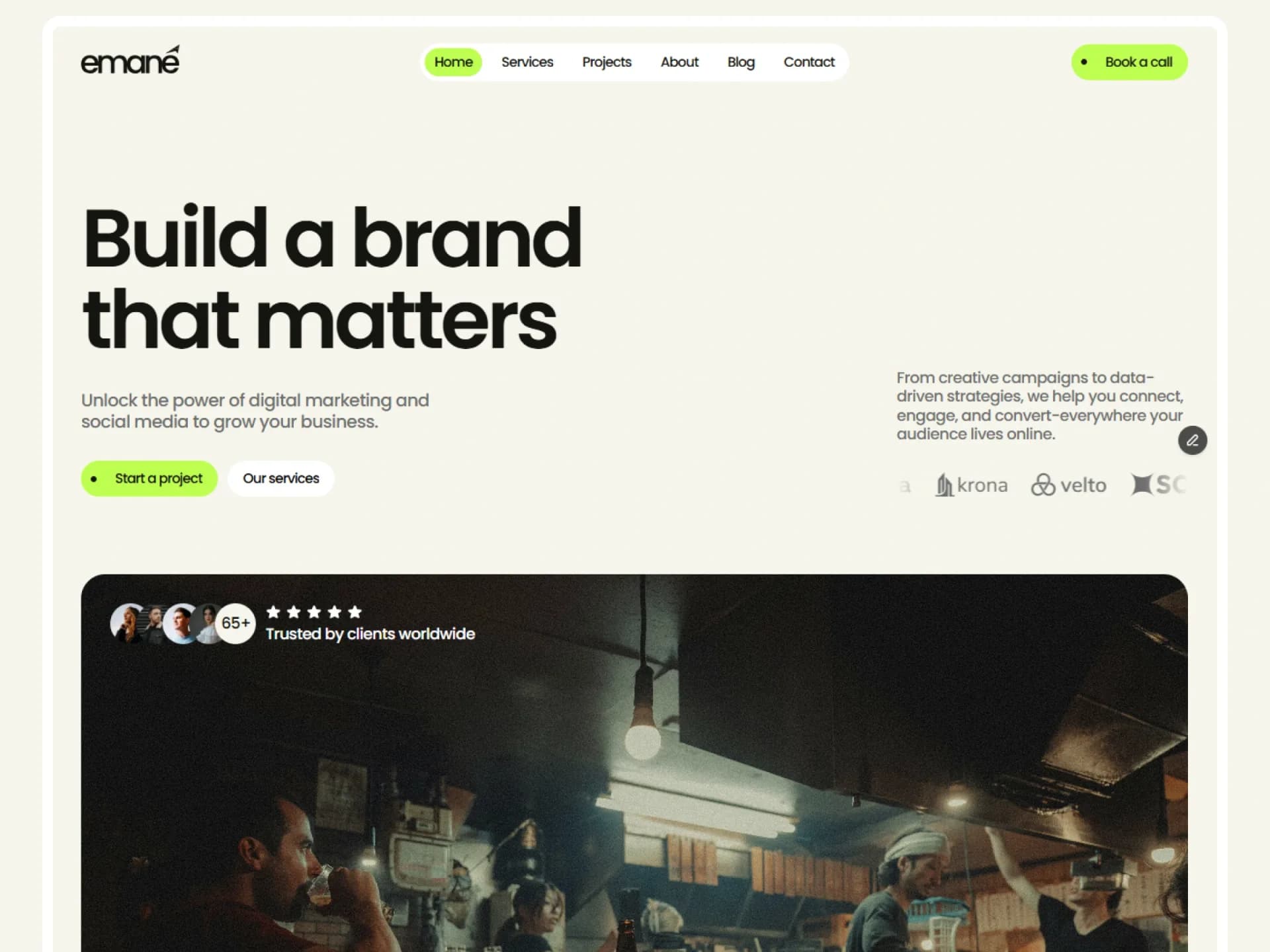
Hero
Hero Image
Page heading and summary over a wide image that settles into place as it scrolls into view; optional breadcrumbs and facts.
Layout and motion from the Nitip template — see it in context"use client";
import * as React from "react";
import Link from "next/link";
import { ScrollReveal } from "@/components/ui/scroll-reveal";
import { cn } from "@/lib/utils";
/*
* Hero Image — page heading and summary over a wide image that settles into place as it scrolls into view; optional
* breadcrumbs above the heading and a row of facts under the summary.
* Source: marcframe/nitip → components/sections/ServiceHeroSection.tsx, PostHeroSection.tsx and
* ProjectHeroSection.tsx (one layout with optional parts).
*
* Layout kept from Framer: heading up to 56rem wide, summary up to 48rem, then a 30:17 image across the container.
* The facts sit under a divider: stacked on phones, a row from 768px.
* Motion kept: the image scales from 120% (110% below 768px) to 100% while its frame scrolls into view — linear, tied
* to scroll, clipped by the frame (scroll-reveal). Static with reduced motion.
*/
export type HeroImageFact = { label: string; value: React.ReactNode };
export type HeroImageProps = {
/** Heading level: h1 when the hero opens the page. */
as?: "h1" | "h2";
/** Trail above the heading; the last item is the current page. */
breadcrumbs?: { label: string; href?: string }[];
title?: string;
description?: string;
/** Short label / value pairs under the summary (year, services, industry…). */
facts?: HeroImageFact[];
image?: { src: string; alt: string };
className?: string;
};
const defaults = {
breadcrumbs: [{ label: "Home", href: "/" }, { label: "Projects", href: "/projects" }, { label: "Harvest Kitchen" }],
title: "Harvest Kitchen: a seasonal menu launch that sold out in a week",
description:
"We rebuilt the restaurant's social presence around its kitchen — short videos, a booking-first profile and a launch campaign that filled every table.",
facts: [
{ label: "Year", value: "2025" },
{ label: "Services", value: "Social media, Content, Paid ads" },
{ label: "Industry", value: "Food & beverage" },
],
image: {
src: "https://images.unsplash.com/photo-1517248135467-4c7edcad34c4?auto=format&fit=crop&w=2000&q=80",
alt: "Restaurant dining room with rows of dark tables and chairs",
},
};
const phoneQuery = "(max-width: 767px)";
const subscribe = (onChange: () => void) => {
const query = window.matchMedia(phoneQuery);
query.addEventListener("change", onChange);
return () => query.removeEventListener("change", onChange);
};
export function HeroImage({
as: Heading = "h1",
breadcrumbs = defaults.breadcrumbs,
title = defaults.title,
description = defaults.description,
facts = defaults.facts,
image = defaults.image,
className,
}: HeroImageProps) {
const phone = React.useSyncExternalStore(subscribe, () => window.matchMedia(phoneQuery).matches, () => false);
return (
<section className={cn("py-(--section-y)", className)}>
<div className="mx-auto flex max-w-(--container) flex-col gap-10 px-(--gutter) md:gap-12">
<div className="flex flex-col gap-6 md:gap-8">
<div className="flex flex-col gap-3">
{breadcrumbs.length > 0 && (
<nav aria-label="Breadcrumb">
<ol className="flex flex-wrap items-center gap-1.5 text-sm text-muted-foreground">
{breadcrumbs.map((crumb, i) => {
const last = i === breadcrumbs.length - 1;
return (
<li key={`${crumb.label}-${i}`} className="inline-flex items-center gap-1.5">
{crumb.href && !last ? (
<Link href={crumb.href} className="transition-colors hover:text-foreground">
{crumb.label}
</Link>
) : (
<span aria-current={last ? "page" : undefined} className={cn(last && "text-foreground")}>
{crumb.label}
</span>
)}
{!last && <span aria-hidden>/</span>}
</li>
);
})}
</ol>
</nav>
)}
<Heading className="max-w-4xl font-heading text-h1 font-semibold tracking-tight text-balance">{title}</Heading>
</div>
<p className="max-w-3xl text-lead text-pretty text-muted-foreground">{description}</p>
{facts.length > 0 && (
<dl className="flex flex-col gap-5 border-t border-border pt-6 md:flex-row md:gap-12 md:pt-8">
{facts.map((fact) => (
<div key={fact.label} className="flex min-w-0 flex-col gap-1 md:flex-1">
<dt className="text-sm text-muted-foreground">{fact.label}</dt>
<dd>{fact.value}</dd>
</div>
))}
</dl>
)}
</div>
<ScrollReveal from={{ scale: phone ? 1.1 : 1.2 }} className="overflow-hidden rounded-xl bg-muted">
<img src={image.src} alt={image.alt} className="block aspect-[30/17] w-full object-cover" />
</ScrollReveal>
</div>
</section>
);
}Installation
$ npx shadcn@latest add https://framebrick.co/r/blocks/hero-image.json1. Add the Framebrick UI components it uses (they bring Motion).
npx shadcn@latest add https://framebrick.co/r/scroll-reveal.json2. Add the block tokens to
app/globals.cssonce (theming).npx shadcn@latest add https://framebrick.co/r/blocks/tokens.json3. Copy the block into
components/hero-image.tsx."use client"; import * as React from "react"; import Link from "next/link"; import { ScrollReveal } from "@/components/ui/scroll-reveal"; import { cn } from "@/lib/utils"; /* * Hero Image — page heading and summary over a wide image that settles into place as it scrolls into view; optional * breadcrumbs above the heading and a row of facts under the summary. * Source: marcframe/nitip → components/sections/ServiceHeroSection.tsx, PostHeroSection.tsx and * ProjectHeroSection.tsx (one layout with optional parts). * * Layout kept from Framer: heading up to 56rem wide, summary up to 48rem, then a 30:17 image across the container. * The facts sit under a divider: stacked on phones, a row from 768px. * Motion kept: the image scales from 120% (110% below 768px) to 100% while its frame scrolls into view — linear, tied * to scroll, clipped by the frame (scroll-reveal). Static with reduced motion. */ export type HeroImageFact = { label: string; value: React.ReactNode }; export type HeroImageProps = { /** Heading level: h1 when the hero opens the page. */ as?: "h1" | "h2"; /** Trail above the heading; the last item is the current page. */ breadcrumbs?: { label: string; href?: string }[]; title?: string; description?: string; /** Short label / value pairs under the summary (year, services, industry…). */ facts?: HeroImageFact[]; image?: { src: string; alt: string }; className?: string; }; const defaults = { breadcrumbs: [{ label: "Home", href: "/" }, { label: "Projects", href: "/projects" }, { label: "Harvest Kitchen" }], title: "Harvest Kitchen: a seasonal menu launch that sold out in a week", description: "We rebuilt the restaurant's social presence around its kitchen — short videos, a booking-first profile and a launch campaign that filled every table.", facts: [ { label: "Year", value: "2025" }, { label: "Services", value: "Social media, Content, Paid ads" }, { label: "Industry", value: "Food & beverage" }, ], image: { src: "https://images.unsplash.com/photo-1517248135467-4c7edcad34c4?auto=format&fit=crop&w=2000&q=80", alt: "Restaurant dining room with rows of dark tables and chairs", }, }; const phoneQuery = "(max-width: 767px)"; const subscribe = (onChange: () => void) => { const query = window.matchMedia(phoneQuery); query.addEventListener("change", onChange); return () => query.removeEventListener("change", onChange); }; export function HeroImage({ as: Heading = "h1", breadcrumbs = defaults.breadcrumbs, title = defaults.title, description = defaults.description, facts = defaults.facts, image = defaults.image, className, }: HeroImageProps) { const phone = React.useSyncExternalStore(subscribe, () => window.matchMedia(phoneQuery).matches, () => false); return ( <section className={cn("py-(--section-y)", className)}> <div className="mx-auto flex max-w-(--container) flex-col gap-10 px-(--gutter) md:gap-12"> <div className="flex flex-col gap-6 md:gap-8"> <div className="flex flex-col gap-3"> {breadcrumbs.length > 0 && ( <nav aria-label="Breadcrumb"> <ol className="flex flex-wrap items-center gap-1.5 text-sm text-muted-foreground"> {breadcrumbs.map((crumb, i) => { const last = i === breadcrumbs.length - 1; return ( <li key={`${crumb.label}-${i}`} className="inline-flex items-center gap-1.5"> {crumb.href && !last ? ( <Link href={crumb.href} className="transition-colors hover:text-foreground"> {crumb.label} </Link> ) : ( <span aria-current={last ? "page" : undefined} className={cn(last && "text-foreground")}> {crumb.label} </span> )} {!last && <span aria-hidden>/</span>} </li> ); })} </ol> </nav> )} <Heading className="max-w-4xl font-heading text-h1 font-semibold tracking-tight text-balance">{title}</Heading> </div> <p className="max-w-3xl text-lead text-pretty text-muted-foreground">{description}</p> {facts.length > 0 && ( <dl className="flex flex-col gap-5 border-t border-border pt-6 md:flex-row md:gap-12 md:pt-8"> {facts.map((fact) => ( <div key={fact.label} className="flex min-w-0 flex-col gap-1 md:flex-1"> <dt className="text-sm text-muted-foreground">{fact.label}</dt> <dd>{fact.value}</dd> </div> ))} </dl> )} </div> <ScrollReveal from={{ scale: phone ? 1.1 : 1.2 }} className="overflow-hidden rounded-xl bg-muted"> <img src={image.src} alt={image.alt} className="block aspect-[30/17] w-full object-cover" /> </ScrollReveal> </div> </section> ); }
Usage
import { HeroImage } from "@/components/hero-image";

<HeroImage
  breadcrumbs={[{ label: "Home", href: "/" }, { label: "Projects", href: "/projects" }, { label: "Harvest Kitchen" }]}
  title="Harvest Kitchen: a seasonal menu launch"
  description="…"
  facts={[{ label: "Year", value: "2025" }, { label: "Industry", value: "Food & beverage" }]}
  image={{ src: "/work/harvest.jpg", alt: "Restaurant dining room" }}
/>
Props
| Prop | Type | Default | Description |
|---|---|---|---|
| as | "h1" | "h2" | "h1" | Heading level of the title. |
| breadcrumbs | { label, href? }[] | Home / Projects / … | Trail above the heading; the last item is the current page. [] hides it. |
| title / description | string | — | Heading (up to 56rem wide) and summary (up to 48rem). |
| facts | { label, value: ReactNode }[] | Year, Services, Industry | Pairs under a divider — a row from 768px. [] hides them. |
| image | { src, alt } | — | Shown at 30:17 across the container. |
| className | string | — | Classes for the <section>. |
- The image scales from 120% (110% below 768px) to 100% while its frame scrolls into view — linear, tied to scroll, clipped by the frame. Static with reduced motion.
- In the preview the frame scrolls on its own: scroll inside it to see the image settle.
AI prompt
Paste into v0, Lovable, Bolt or Claude to rebuild this block in your own project.
Create a React + Tailwind CSS block called HeroImage (Next.js).
- <section className="py-(--section-y)">, container mx-auto max-w-(--container) px-(--gutter), column gap-10 md:gap-12.
- Optional breadcrumbs (nav aria-label="Breadcrumb", ol text-sm text-muted-foreground, "/" separators aria-hidden, links
  hover:text-foreground, last item text-foreground aria-current="page"), then an h1 font-heading text-h1 font-semibold
  tracking-tight max-w-4xl, then a text-lead muted summary max-w-3xl.
- Optional facts: a <dl> under border-t border-border pt-6, stacked below 768px, a row with equal columns (gap-12) from 768px;
  dt text-sm muted, dd default text.
- Image: a frame (overflow-hidden rounded-xl bg-muted) holding a 30:17 object-cover <img>. While the frame scrolls into view the
  image scales from 1.2 (1.1 below 768px) to 1: progress = (innerHeight - frame.top) / frame.height clamped to 0–1, written to
  style.transform in a passive scroll listener (no easing). Skip it when prefers-reduced-motion is reduce.
- Only shadcn variables and block tokens.